
What Are Modern Manufacturing Scheduling Tools?
First of all, let’s discuss the definition of manufacturing scheduling software.
Modern manufacturing scheduling tools are specialized software designed to help manufacturers optimize processes within their factories in real time. Manufacturing organizations almost never have just one project. Usually, they must manage huge project portfolios and align them with plant-floor capacity to solve complex project portfolio management (PPM) challenges, like resource allocation and constantly shifting priorities.
To do it properly, production scheduling software:
- Uses dynamic algorithms.
- Directly integrates with IoT sensors.
- Updates information in ERP (enterprise resource planning) systems in real time.
- Automatically schedules jobs around real constraints.
- Provides the ability to test production changes before applying them to the actual shop floor.
- Provides visibility into all ongoing processes and projects.
Read More: Aerospace Project Management: Key Challenges and How to Address Them
Why Are Spreadsheets Obsolete?
For a long time, Excel and similar spreadsheets were default tools for shop floor planning and managing. However, today, running efficient manufacturing projects using only spreadsheets is almost impossible and not efficient at all. Modern high-mix, low-volume (HMLV) environments have made manual spreadsheets obsolete due to structural limitations:
| Core capability | Excel & Static spreadsheets | Modern manufacturing scheduling tools |
| Data synchronization | Manual data entry; static snapshots that become outdated instantly. | Gather real-time information directly from physical sensors, drones, ERPs, and MES platforms. |
| Constraint handling | Infinite capacity assumption; ignores real-time machine bottlenecks. | Finite capacity scheduling (takes into account resource constraints). |
| Re-scheduling efficiency | Hours of manual cell edits when a machine breaks. | Automated automated re-optimization in seconds via dynamic algorithms. |
| Data integrity | Prone to human error and version control issues. | Centralized single source of truth with audit trails and user permissions. |
If you feel that your team has outgrown traditional spreadsheets, it’s time to pay your attention to more dedicated tools. Schedule a consultation with HYS Enterprise experts to develop your own shop floor scheduling tool or explore the full potential of Epicflow resource management software.
Read More: Top Telecom Project Management Challenges and How to Overcome Them
The Core Evolution: From Static Gantt Charts to AI-Driven Production Scheduling
As was said earlier, static tools like classic spreadsheets or Gantt charts can no longer handle data volumes, required by modern manufacturing enterprises. Moreover, the use of static, manual scheduling tools simply leads to a larger number of errors, resulting in inaccurate data and fragile production schedules that collapse at the first sign of an unplanned shop floor disruption. So, companies needed to invent a response to this problem. But how they went through it?
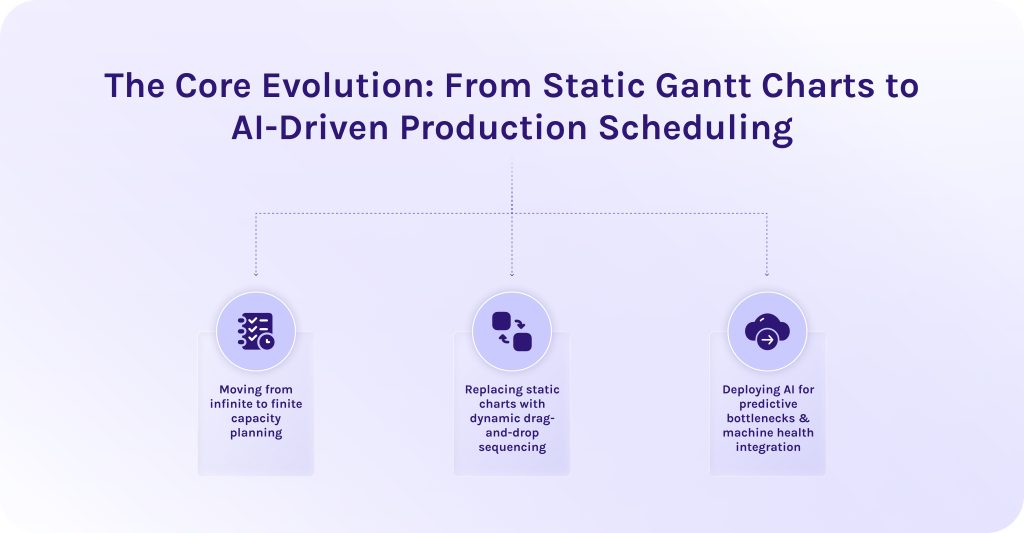
1. Moving from infinite to finite capacity planning.
Early production schedules assumed infinite capacity planning. It is a false assumption that all your resources will always be available by default. Strange as it may sound, but for a long time companies relied heavily on this strategy, not without costly consequences, of course, resulting in severe operational drag across the factory floor.
Operations research from the University of Hawaii shows that 88% of complex enterprise spreadsheets contain errors [1]. In manufacturing, formula oversights and broken cell links lead to incorrect lead times and flawed material requisitions.
In turn, modern manufacturing scheduling tools shifted to finite capacity planning. This approach anchors schedules strictly to real-world operational constraints. It ensures jobs are queued only when all resources are confirmed, preventing unrealistic deadlines and costly delays.
2. Replacing static charts with dynamic drag-and-drop sequencing.
Top production scheduling tools for manufacturing provide dynamic dashboards, thanks to which companies no longer need to constantly re-enter formulas manually. Drag-and-drop interfaces allow managers to reprioritize jobs on the fly, triggering immediate auto-recalculation across the entire operation [2]:
- Dependent downstream tasks shift automatically.
- Changeover times recalculate based on job grouping (e.g., matching tooling or color sequences).
- Immediate visual alerts signal whether a manual adjustment will cause a bottleneck.
3. Deploying AI for predictive bottlenecks & machine health integration.
The latest version of best manufacturing scheduling tools integrates artificial intelligence directly with shop floor IoT telemetry and MES platforms.
- AI uses predictive algorithms to resolve resource bottlenecks. Machine learning models continuously analyze production velocity. Thanks to AI scheduling tools, they can identify emerging line slowdowns hours before buffer stock builds up and dynamically re-routing jobs tasks.
- AI synchronizes predictive maintenance. Early failure signals from machine sensors trigger automated schedule adjustments, preventing costly equipment breakdowns.
Read More: The Transformative Role of Generative AI in IoT
Essential Features of Top Production Scheduling Tools for Manufacturing
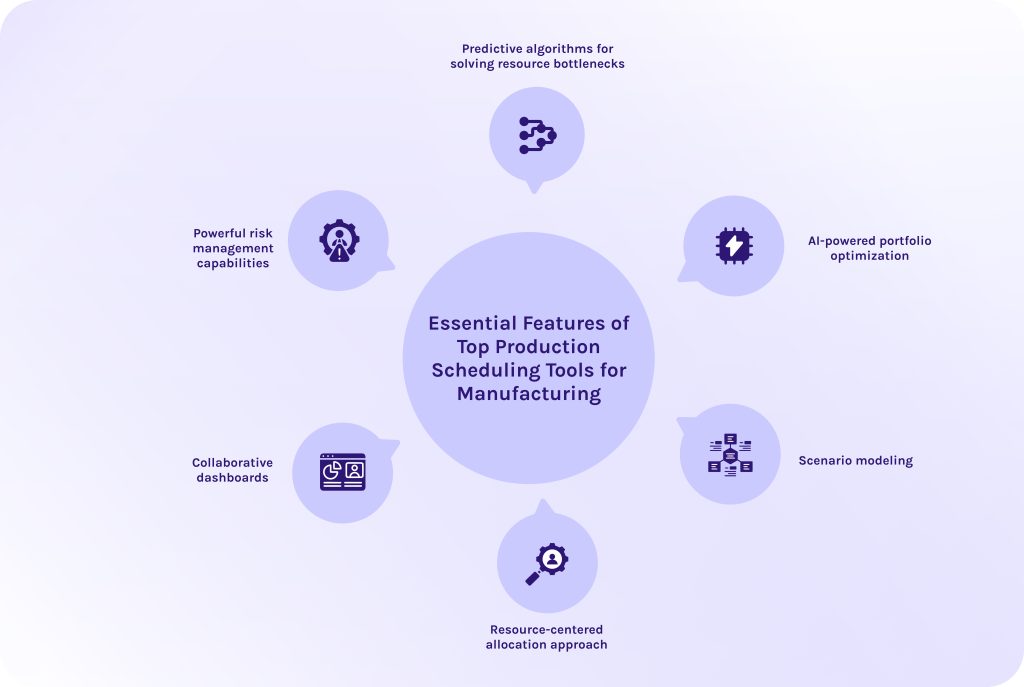
When you approach the stage of selecting scheduling software, look forward these features:
1. Predictive algorithms for solving resource bottlenecks.
Manufacturing scheduling tools must continuously analyze various production metrics. Thus, by processing historical throughput and live operational data, predictive algorithms detect emerging bottlenecks early, not allowing them to escalate further. Then, algorithms can re-prioritize activities to optimize processes or automatically reallocate resources to cover unsolved pain points.
2. AI-powered portfolio optimization.
Manufacturing is a highly competitive field, where stakes are so high that a single bottleneck can derail entire production cycles. Here, teams operate under a constant pressure of competing for shared factory resources [3].
Thus, some of the best manufacturing scheduling tools, like Epicflow developed by HYS Enterprise, are now equipped with AI-powered portfolio engines. Artificial intelligence in manufacturing dynamically balances competing priorities across simultaneous project streams. The software evaluates plant-wide trade-offs to optimize overall yield, preventing low-margin jobs from blocking strategic client deliverables.
3. Scenario modeling.
AI-driven production scheduling software offers one more critical feature – scenario modeling. It allows teams to test operational changes risk-free before committing them to the master plan. For instance, you can simulate:
- Inserting an urgent customer order into the active queue.
- How reprioritizing will impact project portfolio efficiency and revenue.
- Simulating the loss of a key machine or specialized tooling setup.
- How reallocating critical resources will impact delivery due dates.
- Assessing the impact of adding weekend overtime or extra shifts on overall delivery dates.
4. Resource-centered allocation approach.
Manufacturing scheduling tools that rely on a resource-centered approach build the schedule around the actual physical state of critical resources. These tools for manufacturing perceive all resources as interdependent constraints. A work order is released to the floor only when 100% of its required resources are verified and prepped.
5. Collaborative dashboards.
Modern manufacturing scheduling tools provide central visual hubs accessible across departments. Collaborative boards link different teams and departments with each other so that everyone uses a single source of truth. Furthermore, if data in these dashboards updates or becomes no longer relevant, each team member is aware of it, avoiding operational silos and misalignment [5].
6. Powerful risk management capabilities.
Risk management modules built-in production scheduling tools continuously score the health and feasibility of the master schedule against external volatility. Thanks to predictive algorithms we discussed earlier, the scheduling software flags high-risk work orders susceptible to delays of any other problems. Managers receive automated risk warnings alongside recommended mitigation paths to protect schedules and projects.
If you’re struggling with managing too many competing priorities at once, it’s time to think about adopting smart modern software for manufacturing enterprise workflow automation. Contact Epicflow experts to see a personalized demo of our AI portfolio optimizer.
Additional capabilities worth mentioning
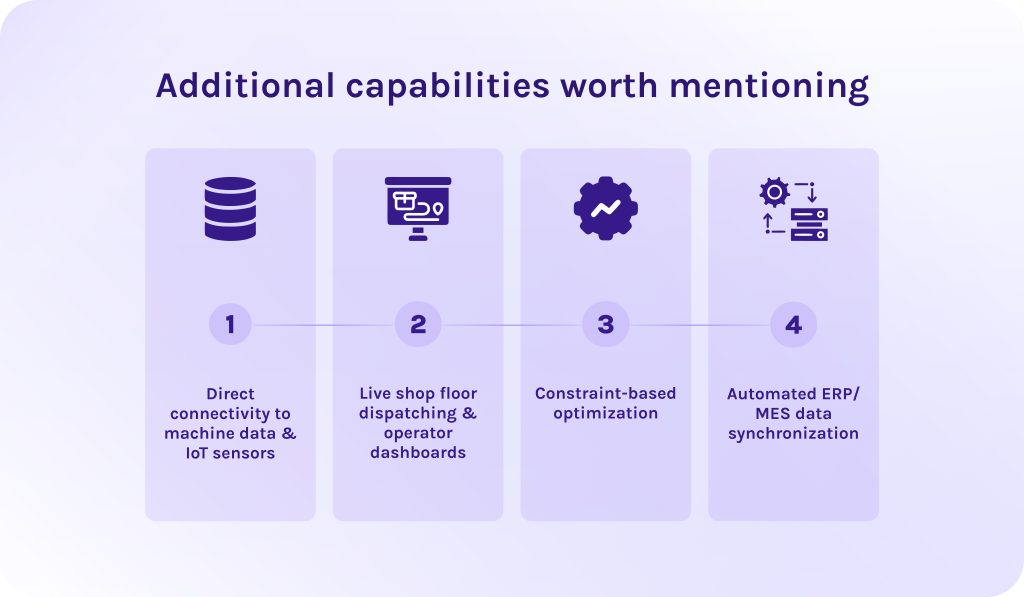
1. Direct connectivity to machine data & IoT sensors.
More specialized manufacturing production scheduling solutions can directly connect to machine PLCs (programmable logic controllers) and industrial IoT (internet of things) sensors via standard protocols (OPC UA, MTConnect). When a machine experiences unexpected downtime, the manufacturing scheduling software converts that signal into instant schedule updates, recalculating downstream times automatically [4].
2. Live shop floor dispatching & operator dashboards.
Another additional feature that tools for manufacturing can include are interactive touch-screen terminals stationed directly at workstations. Supervisors push real-time work queues to operators on the floor. Operators view updated data and report component shortages on the fly.
3. Constraint-based optimization.
As we discussed earlier, the core engine leverages finite capacity algorithms to evaluate all operational constraints simultaneously before assigning job start times. It validates different metrics to eliminate impossible scheduling overlaps.
4. Automated ERP/MES data synchronization.
Sometimes manufacturing scheduling tools connect high-level business software (ERP systems) and execution systems (MES).
-
- Bi-directional ERP link. Automatically imports customer sales orders, bill of materials (BOMs), and target due dates, while pushing recalculated completion times and actual material usage back to the ERP.
- Bi-directional MES link. Gathers live quality inspection metrics straight from the shop floor layer to maintain continuous schedule alignment.
Read More: The Definitive Guide to Enterprise Project Management Software for 2026
In-Depth Comparison: Top Production Scheduling Tools for Manufacturing
1. Epicflow
Target industry & shop floor fit
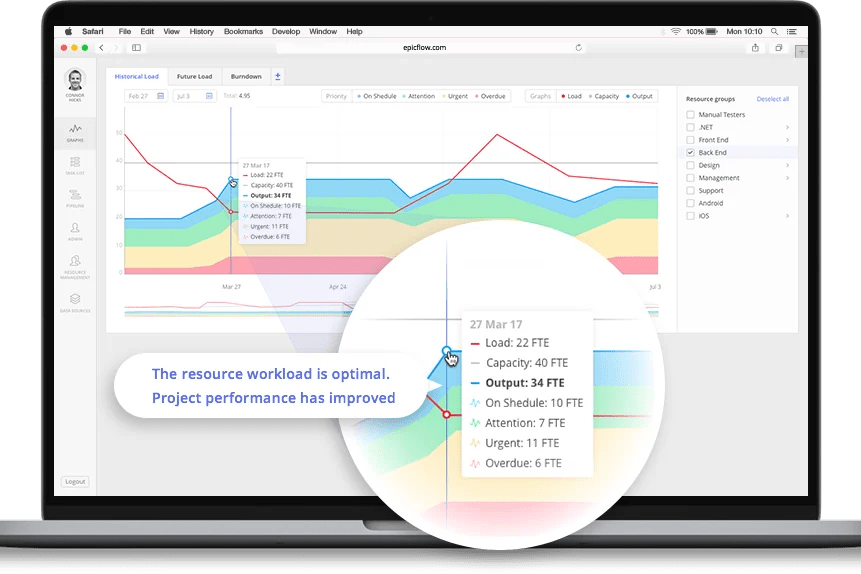
Epicflow is an enterprise resource management platform whose main strength lies in suitability for any high-stakes industry with complex corporate workflows and shared resource pool. This manufacturing scheduling software is purpose-built for complex, multi-project manufacturing environments and high-tech R&D setups where project portfolio management (PPM) challenges overlap with shop floor execution. It excels when multiple high-value project builds compete simultaneously for shared resources, whether it is engineering teams or specialized machinery.
Key scheduling strengths
- AI Portfolio Optimizer. An innovative AI-powered engine that continuously analyzes resource loads across all active projects and prioritizes task queues based on value-per-constrained-hour.
- Resource-centered load balancing. This technology allows companies to automatically level workloads by evaluating cross-functional skill sets, preventing specialist burnout and resource over-allocation.
- API-based data synchronization. Epicflow seamlessly connects with enterprise ERPs (e.g., SAP) and project management ecosystems (e.g., Jira, MS Project).
Handling real-time data and dynamic rescheduling
Epicflow dynamically evaluates project velocity and buffers. If some part of the process breaks, its predictive engine runs instant scenario simulations (“what-if” testing). It automatically re-sequences downstream project tasks across the entire portfolio without requiring planners to make manual edits.
Pros
- Users value its ease of use.
- Helps prioritize projects relying on actual data and business value.
- Has strong resource scheduling and managing features.
- Provides unmatched portfolio visibility.
- Protects shared human and technical resources from being wasted.
Cons
- Requires rigorous upfront data governance.
- Less focused on discrete machine telemetries.
System requirements & deployment
- Deployment: 100% cloud-native SaaS or private cloud hosting.
- System requirements: Modern web browser and standard REST API connectivity.
2. MachineMetrics
Target industry & shop floor fit
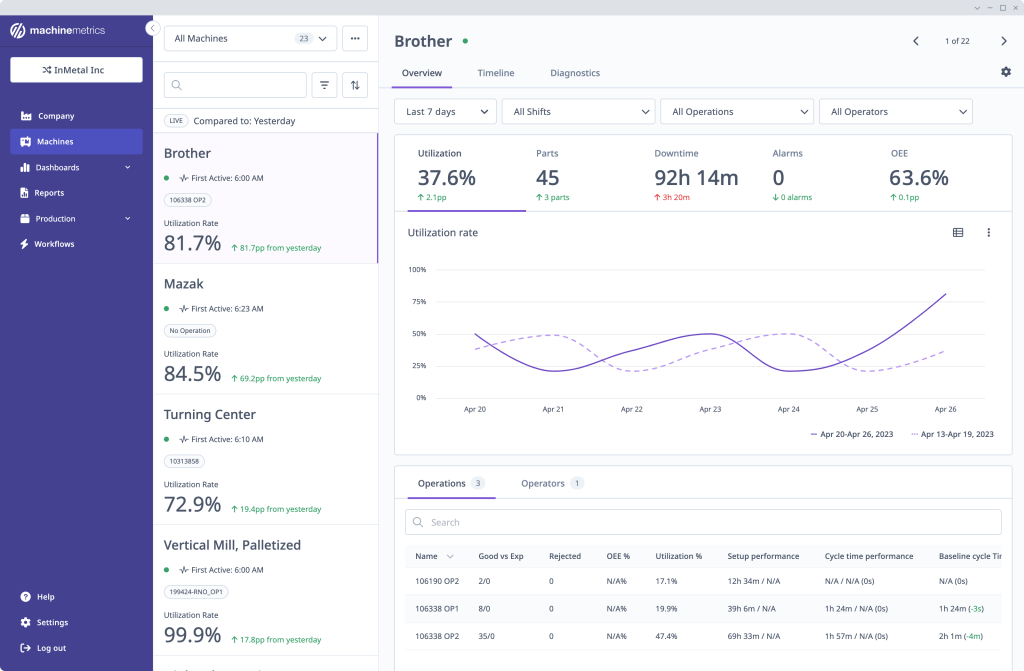
This production scheduling software is an industrial IoT (IIoT) machine data and execution platform tailored for machine-intensive discrete manufacturing. It is designed specifically for plant floors that require direct and quick equipment visibility.
Key scheduling strengths
- Universal machine connectivity. MachineMetrics connects directly to machine PLCs via edge hardware supporting various protocols.
- Automated job matching. The software ingests PLC telemetry to automatically identify running jobs and log labor/run times directly back to ERP records.
- OEE & downtime tracking. This feature allows organizations to automatically categorize machine downtime reasons and calculate true Overall Equipment Effectiveness (OEE).
Handling real-time data and dynamic rescheduling
This software for managing a production schedule operates as a real-time data engine. When a machine runs below standard target speeds, the system generates real-time schedule adjustments and recalculates estimated time to complete (ETTC) for active work orders.
Pros
- Fast plug-and-play machine connectivity.
- Eliminates manual tracking errors.
- Provides deep machine-level operational visibility.
Cons
- Focused primarily on machine telemetry, less versatile.
- Requires integration with an external ERP or APS system.
System requirements & deployment
- Deployment: Cloud-analytics platform paired with on-premise hardware edge devices.
- System requirements: MachineMetrics Edge hardware connected via Ethernet/Wi-Fi directly to machine control cabinets (PLCs) or digital I/O modules.
3. JobPack
Target industry & shop floor fit
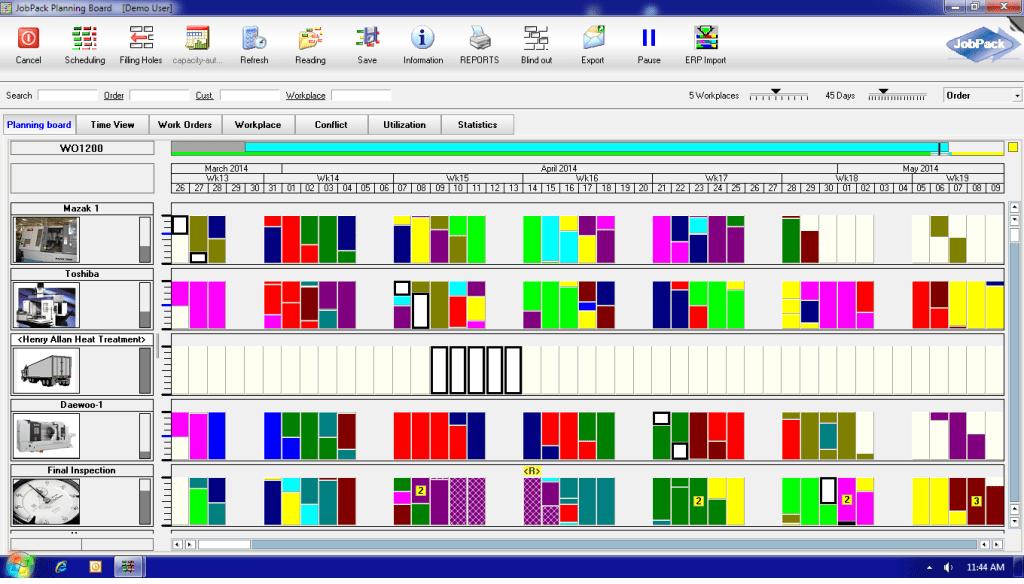
This manufacturing production scheduling solution is a dedicated manufacturing execution system (MES) built specifically for discrete job shops and aerospace component manufacturing.
Key scheduling strengths
-
- Visual drag-and-drop planning board. Features an interactive Gantt board that displays project data on different levels.
- Finite capacity scheduling engine. Calculates schedules strictly around real-world constraints.
- Integrated machine monitoring. Captures live machine indicators alongside the schedule board.
Handling real-time data and dynamic rescheduling
JobPack connects long-range ERP orders with shop floor execution. It has a native “what-if” planning mode that allows schedulers to test the impact of any changes in the scope of work without disrupting live production data. Once approved, the software instantly re-optimizes job sequences across all affected work centers.
Pros
- Built directly for precision machining and job shop logic.
- Has a robust finite-capacity engine.
- Has an excellent risk-free scenario testing.
Cons
- User interface can feel complex and dense for novice planners.
- Initial setup requires detailed machine routing inputs.
System requirements & deployment
- Deployment:
- On-premise server deployment.
- Hosted private cloud.
- Hybrid cloud architecture.
- System requirements:
- Windows Server environment for local deployments.
- ODBC/API connectors for ERP data exchange.
4. NetSuite
Target industry & shop floor fit
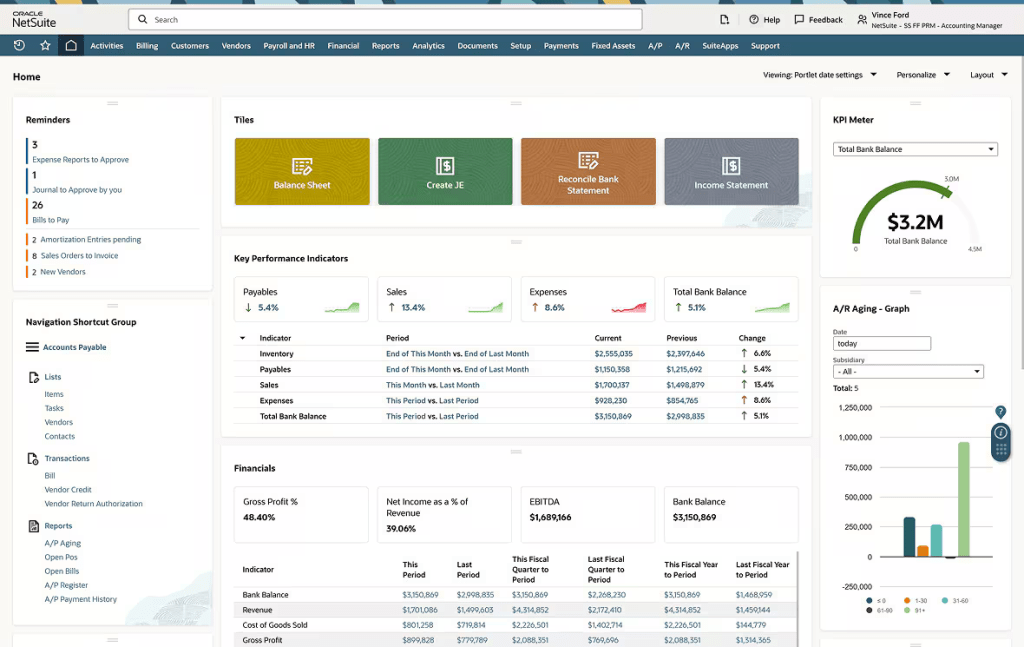
Among other manufacturing scheduling tools, NetSuite Advanced Manufacturing is designed precisely for discrete and process manufacturers who require a unified cloud system to manage everything from financials to supply chain.
Key scheduling strengths
-
- Unified business ecosystem. Directly connects all essential business processes to the production schedule without external middleware.
- Rough-cut & detailed finite scheduling. Supports high-level capacity planning down to detailed work center scheduling based on various machine data metrics.
- Interactive mobile touch-screen tablets. This solution provides digital shop-floor dispatching boards for operators to track manufacturing activities in real time.
Handling real-time data and dynamic rescheduling
The manufacturing production scheduling system continuously updates flow across all business functions. When a raw material shipment is delayed in procurement, NetSuite automatically flags the affected work order on the schedule board, preventing operators from staging the job. Planners can automatically recalculate production sequences across multiple facilities to keep shipping commitments aligned.
Pros
- Completely eliminates data silos between different departments.
- Scales seamlessly across multi-plant global environments.
Cons
- High total cost of ownership (TCO).
- Complex and lengthy implementation process.
System requirements & deployment
- Deployment: 100% multi-tenant cloud SaaS platform (meaning it serves different groups of clients at once, keeping their data secure).
- System requirements: High-speed internet access and modern HTML5-compliant web browsers across desktops and shop-floor mobile tablets.
5. JITbase
Target industry & shop floor fit
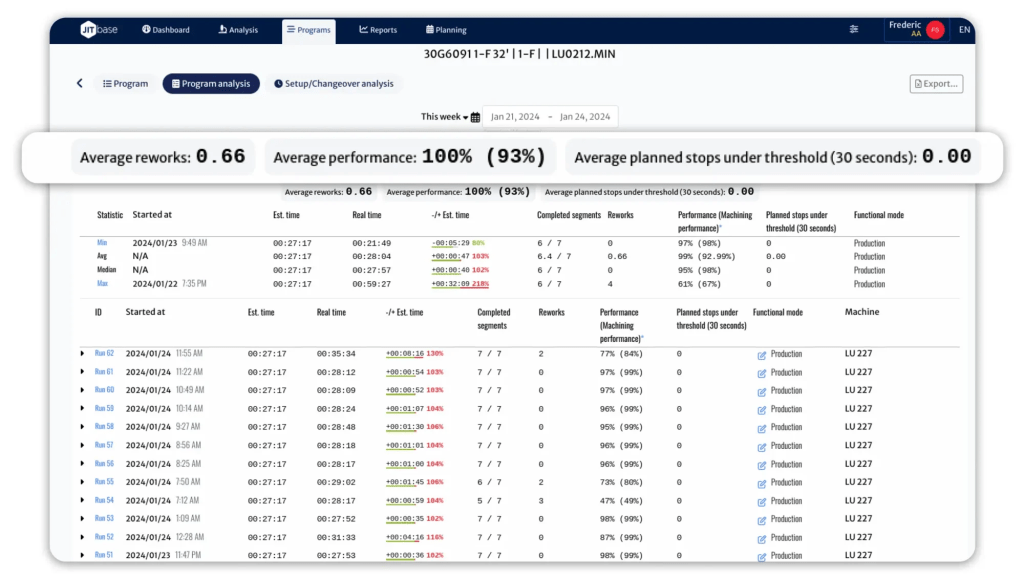
The penultimate solution on our list of the best manufacturing scheduling tools is JITbase. It is a smart shop-floor management and operator routing platform designed specifically for CNC machining environments. Additionally, this AI-driven production scheduling tool can be used in any other environment where operator availability dictates machine output.
Key scheduling strengths
- Smart Operator Routing (OPS). Uses machine learning to calculate the optimal path and sequence for shop floor operators.
- Direct IIoT CNC connectivity. Connects directly to CNC controllers to calculate exact remaining run-times and detect cycle interruptions.
- Machine-to-operator scheduling sync. Links real-time machine telemetry directly with human work queues. It, in turn, ensures that an operator is pre-positioned at a station right as a cycle ends.
Handling real-time data and dynamic rescheduling
JITbase focuses on dynamic micro-scheduling. As machines run, cycle times naturally drift due to certain conditions such as material inconsistencies or, for instance, tool wear. Moreover, it continuously reads these variances in real time and automatically re-routes operator task lists on mobile/wearable devices, minimizing non-productive machine wait time.
Pros
- Uses dedicated AI scheduling tools to optimize processes.
- Dramatically reduces machine idle times.
- Fast installation.
- Highly tailored to CNC workflows.
Cons
- Has narrow operational focus.
- Primarily targets shop floor operator activities.
System requirements & deployment
- Deployment: Cloud SaaS backend paired with local Edge-connectors.
- System requirements:
- Lightweight edge devices on CNC networks.
- Mobile tablets or smart devices for floor operators.
6. Katana
Target industry & shop floor fit
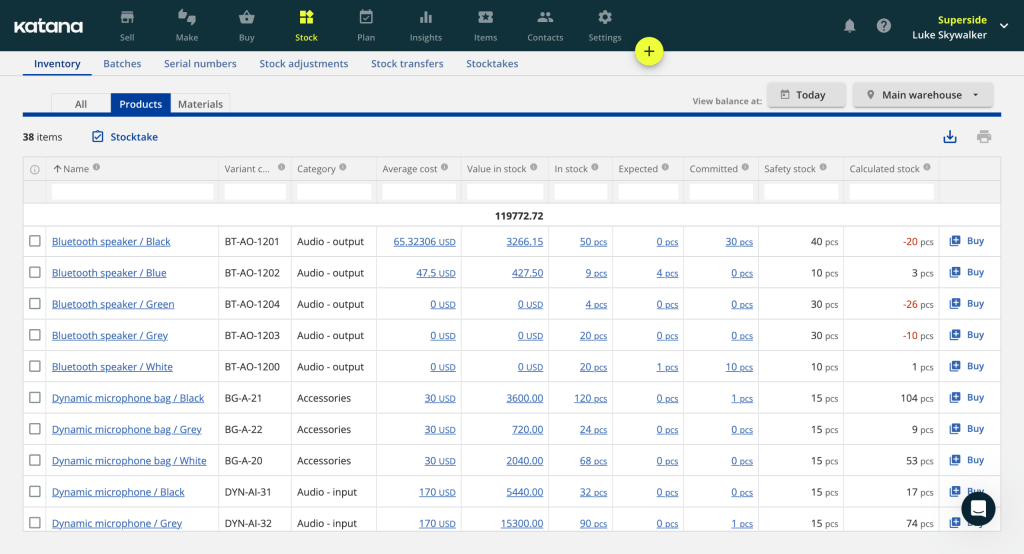
Katana is a cloud-first production scheduling software for manufacturing companies. It is built for small-to-midsize manufacturers (SMEs) and direct-to-consumer/e-commerce brands.
Key scheduling strengths
- Visual drag-and-drop master board. This feature displays real-time job priority lists and order readiness.
- Real-time material auto-allocation. This software for manufacturing production scheduling automatically commits available raw material stock to work orders based on sequence priority.
- Native e-commerce & accounting APIs. Integrates out-of-the-box with platforms like Shopify, WooCommerce, QuickBooks Online, and Xero.
Handling real-time data and dynamic rescheduling
Dynamic scheduling in Katana is handled visually. If a planner drags a high-priority rush order to the top of the master schedule board, Katana automatically re-allocates raw materials from lower-priority jobs down the line in real time. This gives shop supervisors instant feedback on material availability and updated estimated completion dates.
Pros
- Exceptionally intuitive interface.
- Extremely low learning curve.
- Quick implementation.
- Excellent visual material-to-order tracking.
Cons
- Lacks advanced IIoT machine-sensor connectors out-of-the-box.
- Not designed for heavy discrete setups.
System requirements & deployment
- Deployment: 100% cloud-native SaaS.
- System requirements: Modern web browser or Katana Shop Floor App supported on IOS and Android devices.
Read More: Top 10 Open Source Workflow Automation Tools in 2026 (Free & Self-Hosted)
Feature Matrix: Manufacturing Scheduling Tools Comparison
| Tool | Core strength | Trial | Demo | User reviews |
| Epicflow | Dynamic resource management and multi-project bottleneck forecasting. | Yes (for Growth plan) | Yes | G2: 4.4/5
Capterra: 5/5 SoftwareAdvice: 5/5 |
| MachineMetrics | Industrial IoT machine data collection and automated machine telemetry analytics. | No | Yes | G2: 4.3/5
Capterra: 5/5 SoftwareAdvice: – |
| JobPack | Visual finite-capacity drag-and-drop scheduling specifically tailored for discrete job shops (CNC/machining). | No | Yes | G2: 5/5
Capterra: 4.5/5 SoftwareAdvice: 4.5/5 |
| NetSuite | Unified cloud ERP ecosystem that connects high-level demand planning, inventory, and shop floor management. | Yes (3 days) | Yes | G2: 4.1/5
Capterra: 3.9/5 SoftwareAdvice: 4.5/5 |
| JITbase | Smart machine monitoring combined with automated shop floor route optimization. | Yes | Yes | G2: –
Capterra: – SoftwareAdvice: – |
| Katana | Intuitive visual shop floor control and real-time material master allocation. | Free version available | No | G2: 4.4/5
Capterra: 4.6/5 SoftwareAdvice: 4.6/5 |
Read More: Jira Capacity Planning: The Complete Resource Planning Guide
Conclusion
Let’s quickly recap everything covered in this article:
- Manufacturing scheduling tools are software solutions designed specifically for keeping manufacturing processes and resources safe and sound.
- Static scheduling tools for manufacturing fall behind more innovative ones given that they represent only a snapshot of the information that quickly becomes outdated.
- There aren’t the best tools for creating a production schedule. You should choose software depending on the size of your team, size of the project portfolio, needed features, usability, ability to scale the software with time, and, ultimately, adjust it to your requirements.
Whether you need integration with your existing tech stack or master advanced resource balancing, HYS Enterprise experts are here to help. Reach out to our specialists today to audit your current workflows and draw your digital transformation path.
FAQs
1. What are manufacturing scheduling tools?
Manufacturing scheduling tools are specialized software for manufacturing organizations that aim to optimize production workflows and minimize associated risks. They continuously balance finite resource constraints, such as employee work hours, machine capacity, equipment availability, raw materials, and tooling to build the shortest path to efficient project execution.
2. What are some tools used in production scheduling?
For efficient manufacturing production scheduling there are six top solutions:
3. How do production scheduling tools differ from general ERP systems?
4. What role do AI and automation play in modern production scheduling?
5. What is the difference between finite capacity and infinite capacity planning?
6. What are the five types of software used in manufacturing?
7. Why are traditional spreadsheets no longer sufficient for production scheduling?
Because traditional spreadsheets rely heavily on manual data entry. Moreover, they are static, which means that they operate as static snapshots, making them incapable of tracking real-time data.
In such dynamic environments as manufacturing, where data updates constantly and changes are a part of a daily routine, this lack of real-time visibility leads to many risks that could’ve been avoided by using modern, dynamic production scheduling software.
8. How do these tools help reduce setup and changeover times?
Manufacturing scheduling tools use smart algorithms to group jobs with similar characteristics together. Therefore, it minimizes non-productive machine adjustments between runs. They also send digital setup instructions and material pre-staging alerts directly to operator dashboards.
9. How does real-time machine data integrate with scheduling tools?
It’s pretty easy to understand. Real-time production data transmits live operational telemetry like machine outages directly from PLCs or IoT devices via standardized protocols. The scheduling engine automatically ingests this data to update job completion estimates and dynamically recalculate downstream work sequences the moment a floor disruption occurs.
10. Can manufacturing scheduling tools integrate with existing MES and ERP software?
Yes, modern manufacturing scheduling tools are designed to integrate directly with existing ERP and MES platforms. For this purpose, they use standardized APIs or OPC UA protocols.
References
- https://www.researchgate.net/publication/1912352_Spreadsheet_Errors_What_We_Know_What_We_Think_We_Can_Do
- https://www.researchgate.net/publication/331692377_Production_scheduling_in_agent-based_supply_chain_for_manufacturing_efficiency_improvement
- https://www.researchgate.net/publication/389672275_Effective_Production_Planning_and_Scheduling_Literature_Review
- https://www.researchgate.net/publication/221993895_Architecture_of_manufacturing_scheduling_systems_Literature_review_and_an_integrated_proposal
- https://www.researchgate.net/publication/351048848_Scheduling_Optimization_Modelling_A_Case_Study_of_a_Woven_Label_Manufacturing_Company
- https://www.researchgate.net/publication/389672275_Effective_Production_Planning_and_Scheduling_Literature_Review
- https://www.researchgate.net/publication/388732184_A_review_of_AI-powered_production_scheduling_in_smart_factories_Impacts_on_lead_times_and_resource_utilization
- https://www.researchgate.net/publication/362043042_Application_of_Scheduling_Systems_in_Smart_Manufacturing
- https://www.researchgate.net/publication/355001729_Smart_manufacturing_scheduling_A_literature_review