
What Is Workflow Automation?
According to multiple research studies I’ve been studying to prepare this article, enterprise workflow automation is a process of setting up specialized software that will execute repetitive and time-consuming tasks. Thanks to it, human employees don’t have to do them manually, gaining more free time for strategic actions [2].
What Is an Open Source Workflow Automation?
In turn, open-source workflow automation uses software with open code. This means that the underlying source code is freely available for anyone to download and adapt to your specific needs. Moreover, you can self-host it on your own infrastructure, setting up your own security measures [3].
Why Do Companies Adopt Open Source Workflow Automation Tools?
The reasons why companies so massively adopt open source workflow automation tools vary heavily. According to research “Free Software / Open Source: Information Society Opportunities for Europe?,” organizations are driven by ethical, philosophical, and sometimes purely practical factors like avoidance of the vendor lock-in problem or technological independence [4]. Of course, the ability to make their own custom improvements is one of the main reasons too.
Read More: Why Enterprise Agentic AI is the Future of Efficient Workflows
How We Evaluated Open Source Workflow Automation Tools for Our List?
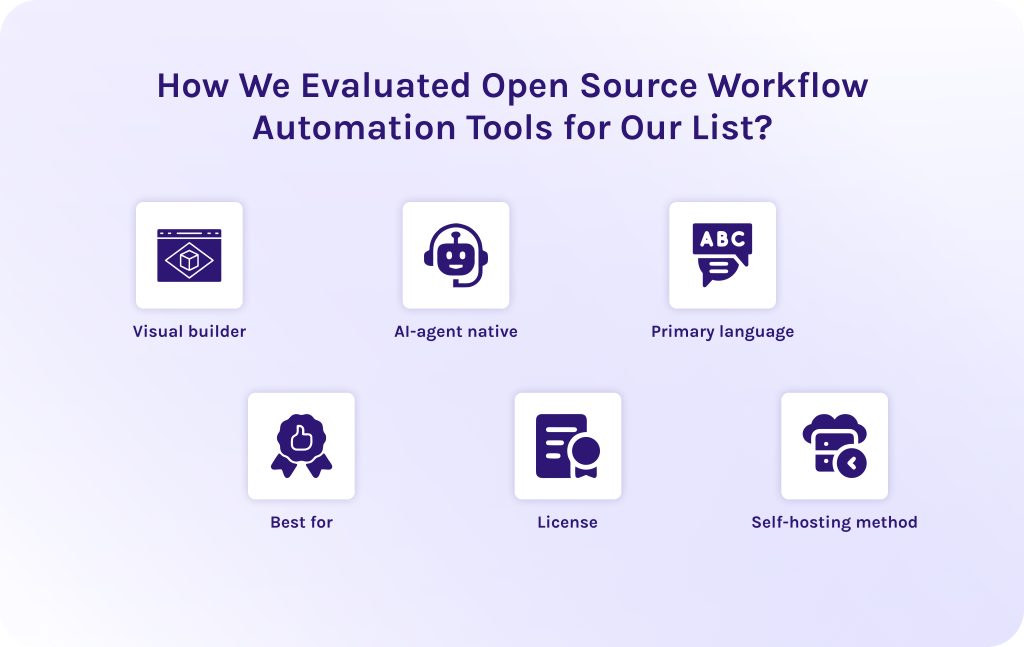
To be as objective as possible, our team has developed a specialized evaluation framework. It takes into account six primary characteristics of open source workflow automation tools.
- Visual builder: We looked at whether the workflow automation software provides a drag-and-drop canvas for visual workflow construction. Without it, only technical specialists can use open source workflow automation tools like n8n, while non-technical specialists will remain dependent on software engineers.
- AI-agent native: We estimated each tool towards its agentic AI nativeness. Agentic workflow automation remains one of the most efficient and promising tendencies in 2026 and the following years, so it was important for us to choose truly efficient open source AI workflow automation tools.
- Primary language: We wanted to understand the core programming language and runtime of the execution engine (such as Python, TypeScript/Node.js, Rust, Go, or Java) to fill our list with workflow automation tools for different developers and purposes. As well, it helped us determine how easily your engineering team can extend, write custom logic for, or inspect the source code.
- Best for: We discovered the primary operational use case and target persona where the open source workflow automation tools deliver maximum value.
- License: We examined the workflow automation software licensing model to clearly distinguish between OSI-approved open-source licenses and source-available or fair-code commercial licenses.
- Self-hosting method: Ultimately, we discovered the primary deployment mechanisms available for hosting the open source workflow automation tools on your own infrastructure.
Read More: AI Outsourcing: Complete Guide to Benefits, Vendor Selection, and Implementation Success
Best Open Source Workflow Automation Tools in 2026: Comparison Table
| Tool | Visual builder | AI-agent native | Primary language | Best for | License | Self-host method |
| EpicStaff | Yes (node canvas) | Yes (built-in) | Python / TypeScript | AI-agent workflows and accessibility for all types of users. | Source-available / open source | Docker compose, Podman |
| n8n | Yes (node canvas) | Yes (LangChain nodes) | TypeScript / Python | App-to-app integrations and workflow automation | Sustainable use license (fair-code) | Docker, Kubernetes, npm |
| Apache Airflow | View-only (DAGs) | No (required plugins) | Python | Data pipeline orchestration & ETL | Apache 2.0 | Docker, Helm (Kubernetes) |
| Activepieces | Yes (flow canvas) | Partial (basic LLM nodes) | TypeScript / Node.js | No-code Zapier alternative for business teams | MIT / Enterprise | Docker compose, Cloudflare |
| Temporal | View-only (web UI) | Partial (SDK wrappers) | Go, Java, Python, TS | Durable microservice execution | MIT / Apache 2.0 | Docker compose, Helm |
| Camunda | Yes (BPMN modeler) | No (plugin extensions) | Java | Enterprise BPMN | Apache 2.0 / Commercial | Docker, Helm (Kubernetes) |
| Windmill | Yes (app/flow builder) | Partial (script integration) | Rust, Python, Go, TS | Turning scripts into internal apps and workflows | AGPLv3 / Enterprise | Docker compose, Helm |
| Node-RED | Yes (flow canvas) | No (third-party nodes) | JavaScript / Node.js | IoT devices, hardware. | Apache 2.0 | Docker, npm, Raspberry Pi |
| Wexflow | Yes (web designer) | No | C# / .NET core | Lightweight cross-platform workflow engine. | MIT | Docker, .NET Service |
| Dagster | View-only (asset graph) | Partial (software-defined) | Python | Modern data orchestration. | Apache 2.0 | Docker, Helm (Kubernetes) |
Read More: How Agentic AI in Manufacturing is Driving the Next Industrial Revolution
The Best Open-Source Workflow Automation Tools
1. EpicStaff – best for AI-agent workflows.
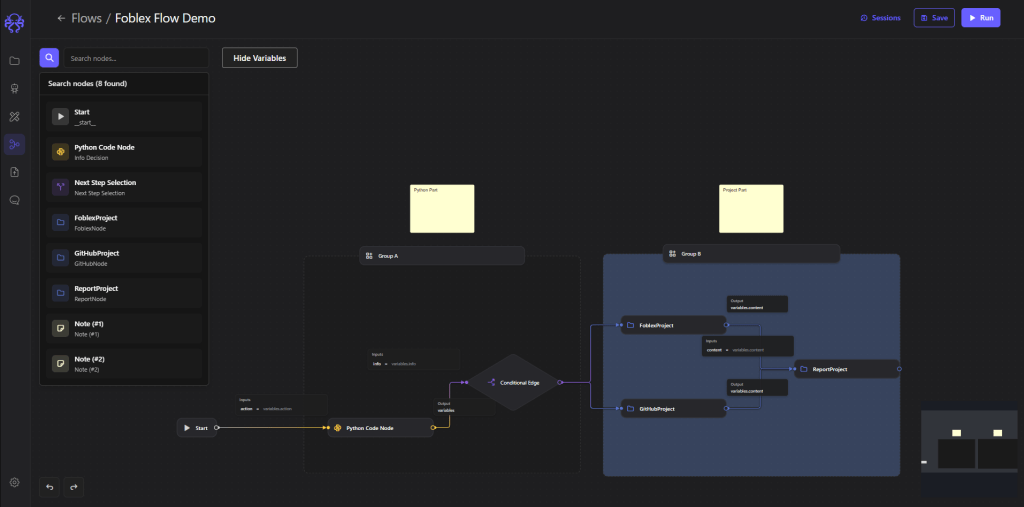
EpicStaff is the first solution from our research of open source workflow automation tools. It is a visual and Python hybrid platform engineered specifically to build, orchestrate, and govern multi-agent AI systems. It’s important to mention that EpicStaff was designed specifically for software engineers and operations teams to bridge the gap between these departments. How exactly? By providing a visual node canvas built over a robust Django backend. It orchestrates complex AI agents with native capabilities for Model Context Protocol (MCP) tool integration, persistent vector memory (RAG), custom Python execution, and voice-agent interaction nodes.
Best for
Any industry and any user type (both technical and non-technical). Will be a perfect solution for AI engineering teams and companies that build their own custom agentic AI solutions.
Standout feature
It combines visual drag-and-drop interface with ability to inject custom code directly in the ready-to-execute workflow.
Pros
- AI agent orchestration for dual audience (technical and non-technical specialists).
- Seamlessly combines visual management with custom Python flexibility.
- Fits perfectly for heavy industries like telecom, manufacturing, logistics as well as for marketing, sales, and operational workflows.
Cons
- Smaller community ecosystem compared to legacy automation tools.
Self-hosting and license
Source-available and built for self-hosting on private infrastructure using Docker and Docker Compose. Explore the EpicStaff GitHub repository or visit the EpicStaff official site for deployment documentation.
2. n8n – best for app-to-app integrations.
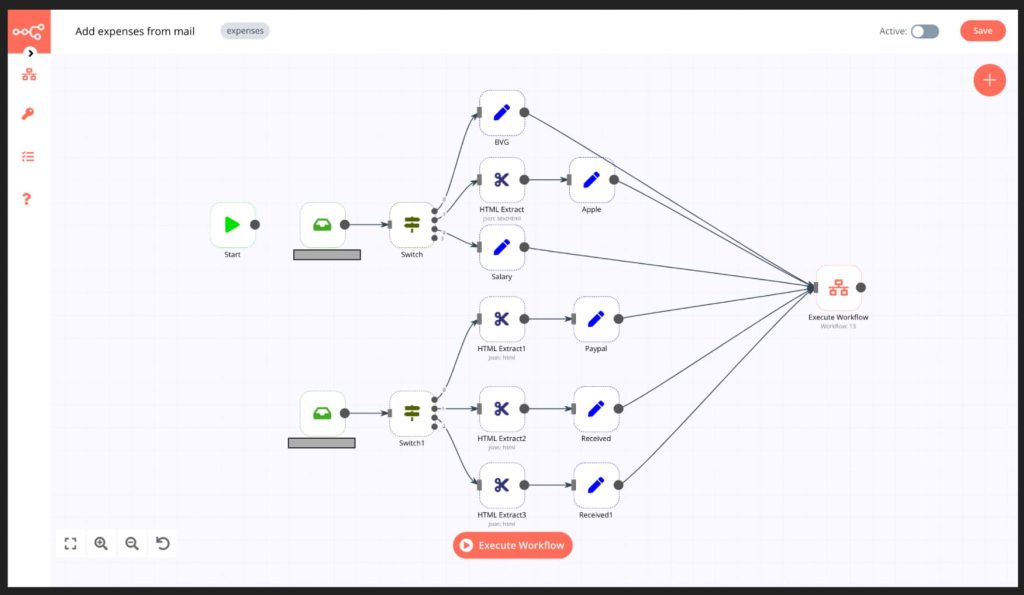
The second solution on our list of workflow automation tools with open source code is n8n. It is a powerful node-based integration platform for connecting different custom services together into one ecosystem through APIs and custom integrations. It enables technical teams to build complex app-to-app workflows visually, thanks to its node-based interface. It offers over 400 pre-built nodes to connect tools like Slack, Salesforce, Postgres, and OpenAI, letting you parse JSON payloads and route data seamlessly across applications [5].
Best for
Developers and technical ops teams that build multi-app SaaS integrations and complex event-driven workflows.
Standout feature
Inline Code Nodes allow developers to drop custom JavaScript or Python directly into any point of a visual flow. Thanks to it, you can manipulate complex data structures without building custom webhooks.
Pros
- Users from the open source community value n8n for its highly flexible visual editor.
- It has an extensive library of native integrations.
- It includes advanced LangChain AI nodes.
Cons
- Memory usage scales rapidly under heavy concurrent executions.
- Its non-standard licensing restricts commercial reselling.
Self-hosting and license
It is distributed under a fair-code Sustainable Use License (free for internal business use, paid for commercial hosting). Can be easily self-hosted via Docker or Kubernetes.
3. Apache Airflow – best for data pipeline orchestration.
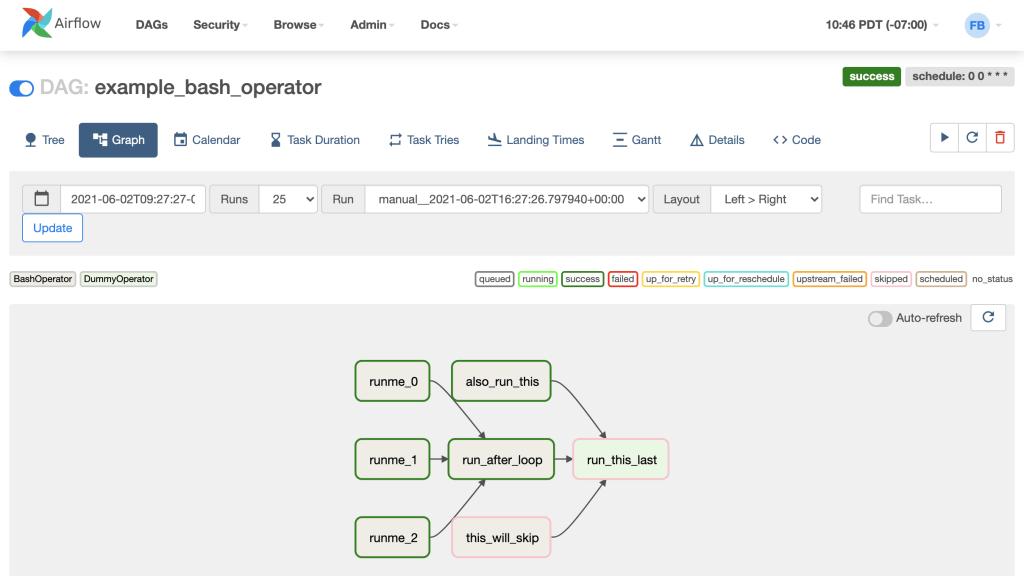
Among other solutions, Apache Airflow stands out for being one of the industry-standard open source workflow automation tools in 2026 for managing complex data engineering workflows. This platform allows data engineers to monitor data pipelines using Python code. It organizes tasks as directed acyclic graphs (DAGs) and coordinates massive data movements.
Best for
Data engineering teams managing large-scale ETL/ELT pipelines.
Standout feature
Its unique capability is a dynamic DAG generation. It allows engineers to programmatically create complex pipelines at runtime based on external database state or configuration files.
Pros
- It is a part of a global ecosystem.
- Has a deep integration with AWS, GCP, Snowflake, and Spark.
- It has highly resilient distributed architecture.
Cons
- Has a steep learning curve.
- May be overhead for small workloads.
- Lacks a native visual workflow builder.
Self-hosting and license
100% open-source under the Apache 2.0 License.
4. Activepieces – best open-source Zapier alternative.
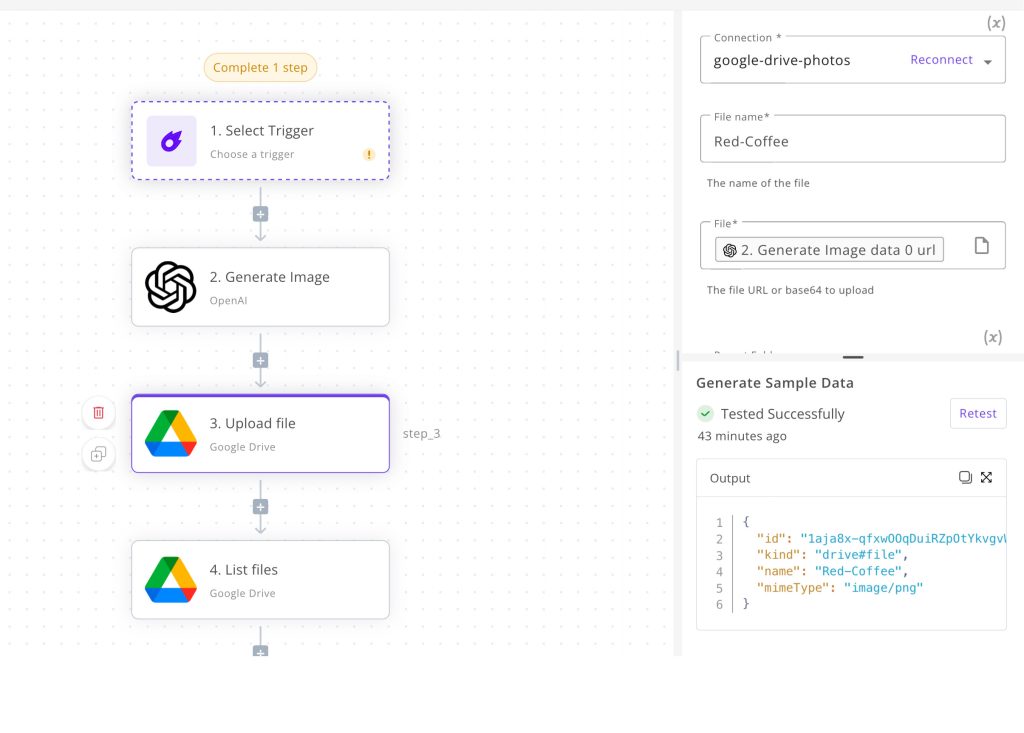
Compared to the other open source workflow automation tools, Activepieces is the most lightweight one. It is a no-code workflow builder designed as one of the best open-source alternatives to Zapier. It gives non-technical business teams a clean canvas to automate routine office tasks. Moreover, it connects popular business software like Google Sheets, Gmail, Notion, and HubSpot with simple trigger-and-action steps.
Best for
Marketing, sales, and operations teams that need an easy, self-hosted no-code tool for daily business automation.
Standout feature
It has a Piece Builder framework that allows developers to write custom integration connectors using TypeScript.
Pros
- Its UI is exceptionally intuitive for non-technical users.
- It is fast to set up.
Cons
- Has a smaller pre-built connector ecosystem compared to n8n or Zapier.
- Its support for complex branching logic is limited.
Self-hosting and license
Core edition is 100% open-source under the MIT License (Enterprise features use a commercial license). Self-hostable using Docker Compose or single-command container deployments.
5. Temporal – best for durable/mission-critical execution.
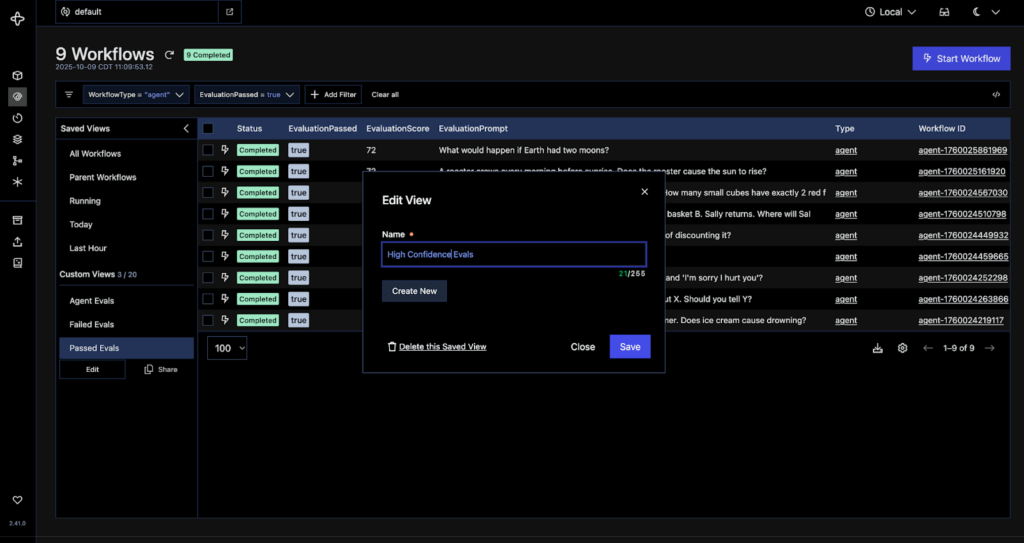
This solution is an enterprise-grade developer platform that guarantees resilient execution for distributed microservices. Temporal is one of the open source workflow automation tools for tracking the progress of backend code across microservices. It ensures that complex multi-step algorithms always run to completion, surviving server crashes and outages.
Best for
Backend engineers writing critical transactional systems and long-running business logic.
Standout feature
Its standout capability is unlimited durability. It automatically restores application state and variables at the exact point of failure without requiring developer-written retry loops.
Pros
- Absolute reliability for critical code.
- It supports native SDKs in Go, Java, Python, and TypeScript.
Cons
- Code-only approach with no visual drag-and-drop workflow builder.
- It is extremely complex to maintain core cluster backends.
Self-hosting and license
Open-source core licensed under the MIT License. Can be self-hosted via Docker or Kubernetes, or run using Temporal CLI binaries.
6. Camunda – best for BPM & process automation.
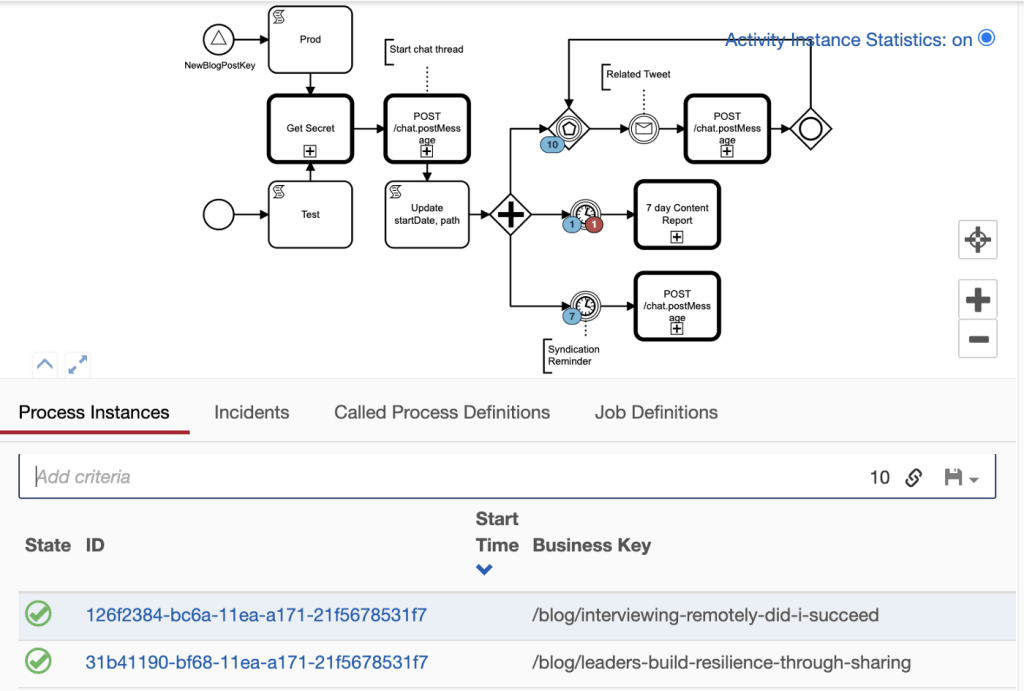
This solution stands out from many others open source workflow automation tools. Camunda connects people, systems, and devices by executing complex, cross-departmental operations. Furthermore, it uses visual modeling standards to align technical software execution with formal business process specifications across large organizations.
Best for
Enterprise architects, compliance teams, and financial institutions that execute complex business operations.
Standout feature
It has a built-in BPMN 2.0 and DMN support that enables business analysts and software developers to collaborate on exact executable workflow diagrams and decision tables on the same platform.
Pros
- It has a highly scalable Zeebe workflow engine.
- Integrates robust human-task management queues.
- Has detailed operational audit compliance.
Cons
- Enterprise focus makes it overly complex for simple SaaS automations.
- Has commercial license restrictions on newer engine versions.
Self-hosting and license
Core engine features source-available/commercial licensing model options (with legacy open-source Camunda 7 under Apache 2.0). Deployable via Docker, Kubernetes, and bare-metal Java runtimes.
7. Windmill – best for turning scripts into workflows.
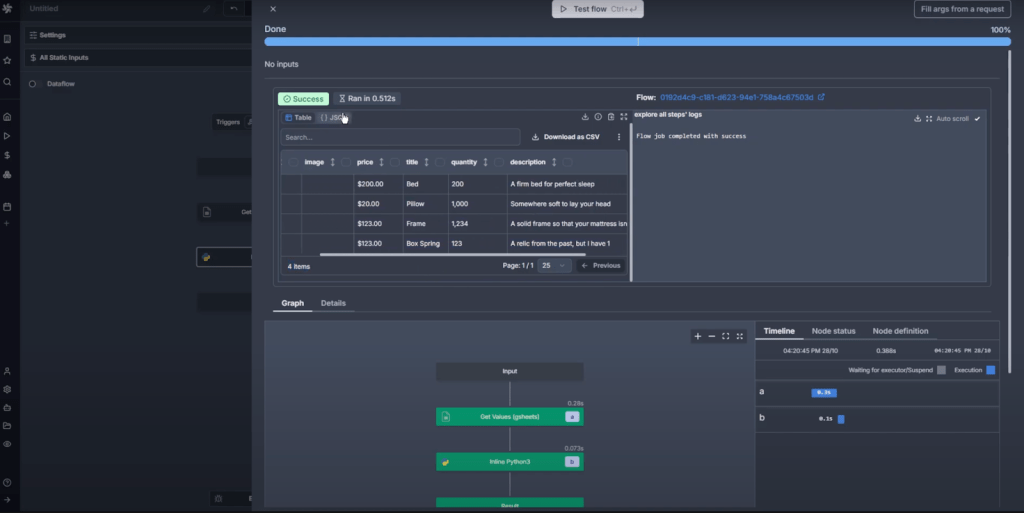
If we take a closer look at this solution on our open source workflow automation tools list, we’ll notice the main difference that makes this tool unique – it transforms standalone scripts into internal tools and workflows. Windmill lets engineers upload scripts written in Python, TypeScript, Go, Bash, or SQL and automatically converts them into endpoints and visual step-by-step flows.
Best for
A decent choice for DevOps and backend teams that build internal administrative tools and automate developer workflows.
Standout feature
It has an automatic UI generation which instantly converts script arguments and parameters into functional front-end input forms without writing front-end code.
Pros
- It is built on Rust for extremely low latency and high execution throughput.
- It also seamlessly supports multi-language workflows.
Cons
- It is primarily designed for developer-centric workflows.
Self-hosting and license
Core engine is open-source under the AGPLv3 License. Easily self-hosted via Docker Compose or Kubernetes.
8. Node-RED – best for IoT & event flows.
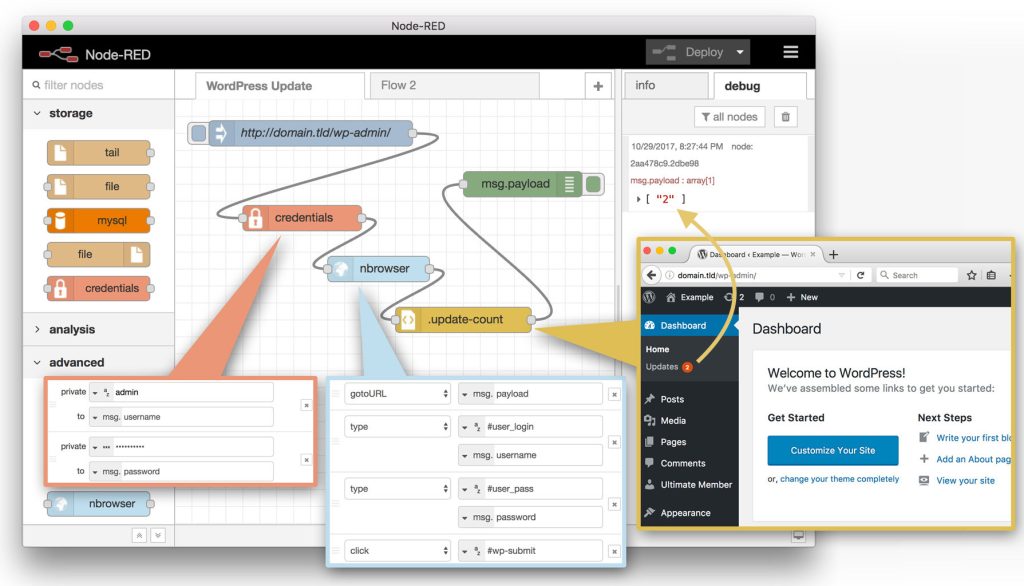
This software is designed as a visual wiring tool for hardware devices and APIs. Among other workflow automation tools, Node-RED provides a lightweight web browser editor that connects hardware sensors, edge devices, online services, and industrial protocols. It uses a message-passing model where data flows through interconnected nodes across real-time networks.
Best for
For everything connected to IoT and smart-home systems. Will be a perfect solution for IoT developers and edge-computing deployments.
Standout feature
This software possesses first-class hardware and protocol support. It natively handles serial connections, Raspberry Pi GPIO pins, MQTT, Modbus, and WebSocket connections out of the box.
Pros
- It has extremely low memory and CPU footprint.
- It runs smoothly on low-cost single-board computers.
- It has a massive community node library.
Cons
- Visual flows can become chaotic and unmanageable for large enterprise business logic.
Self-hosting and license
100% open-source under the Apache 2.0 License. Runs natively on Node.js and can be self-hosted via Docker or directly on single-board devices like Raspberry Pi.
9. Wexflow – best lightweight workflow engine.
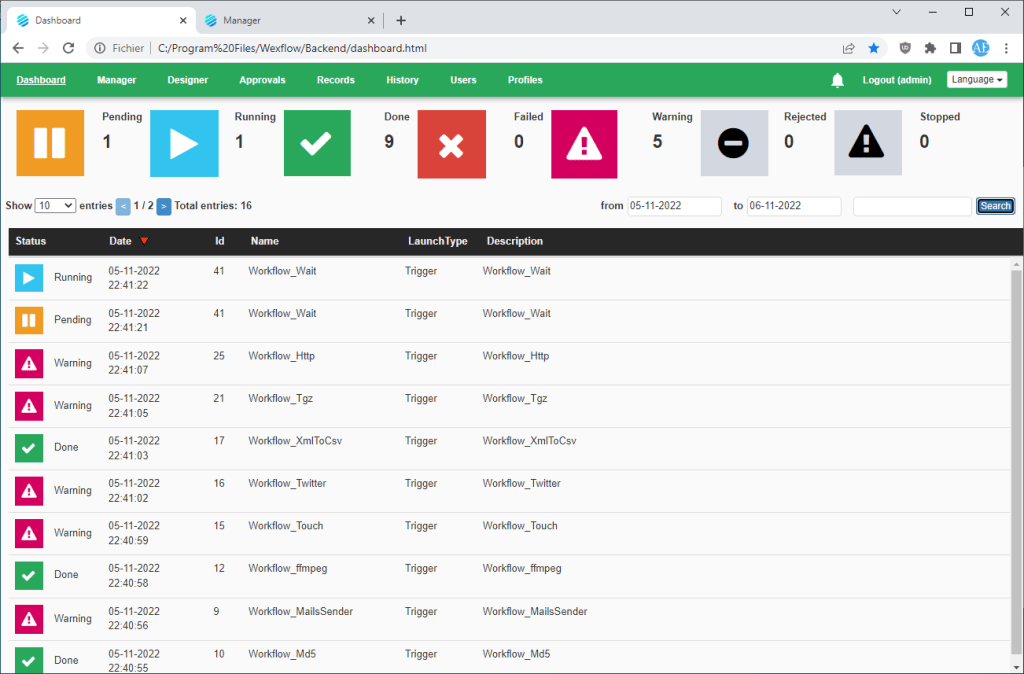
Wexflow is one of the open source workflow automation tools which executes background operations and tasks using XML or JSON files. It runs silently as an operating system service to automate system maintenance and file manipulation.
Best for
Best fit for IT specialists and system administrators. Also will be a great choice for teams working in the .NET environments.
Standout feature
This workflow automation platform has an extensive built-in module library, which includes over 100 pre-configured tasks for file encryption, FTP sync, PDF parsing, archive extraction, and SQL execution out of the box.
Pros
- Open source community values this tool for exceptionally fast performance with minimal resource consumption.
- It runs seamlessly across Windows, Linux, and macOS.
Cons
- It has a dated user interface.
- Schema-driven XML/JSON workflow definitions lack modern drag-and-drop appeal.
Self-hosting and license
Open-source software licensed under the MIT License. Can be deployed as a native Windows Service, Linux daemon, or within Docker containers.
10. Dagster – best modern data orchestration.
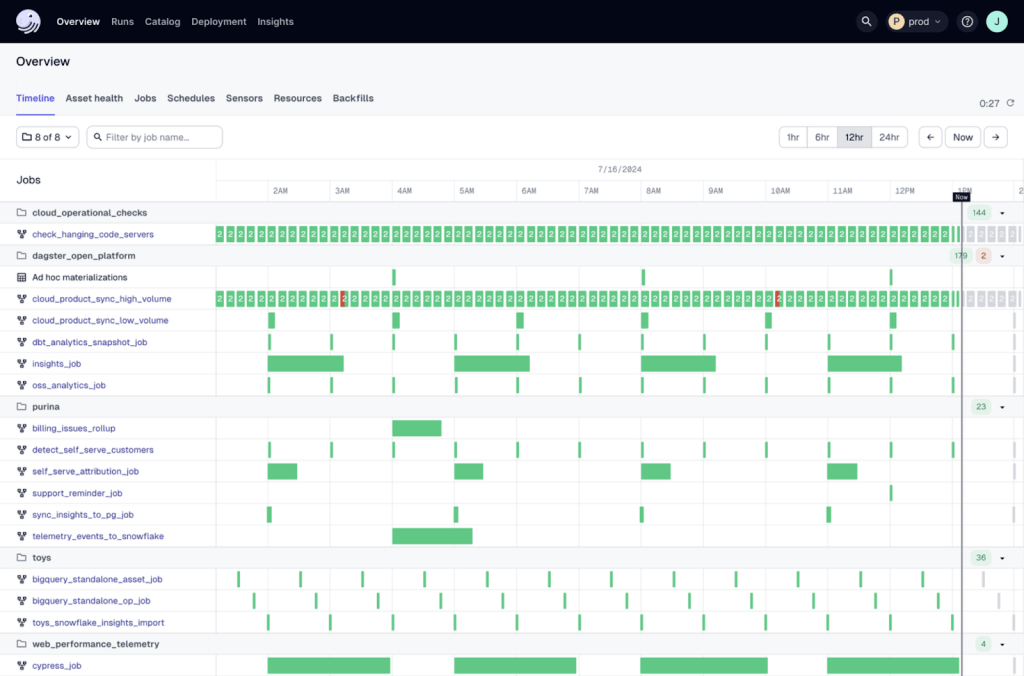
And the last but not least solution on our free workflow automation tools open source list is Dagster. It excels at orchestrating data processing by focusing on software-defined assets (SDAs). It defines what data assets should exist and handles the code execution required to create and update them.
Best for
Perfect fit for data engineering and analytics teams that build high-reliability data platforms.
Standout feature
Asset-centric lineage tracking tracks data freshness asset dependencies directly within its intuitive operational UI.
Pros
- It has native integration with modern tools like dbt, Snowflake, DuckDB, and Spark.
- It has an exceptional local testing and development workflow.
Cons
- It requires a mental shift from traditional task-based orchestration (like Airflow).
- It requires solid Python expertise.
Self-hosting and license
Open-source core under the Apache 2.0 License. Can be self-hosted via Docker, Helm on Kubernetes, or deployed locally with pip.
Read More: 10 Zapier Alternatives You Should Be Using
Open Source vs. Free SaaS: What You Actually Get?
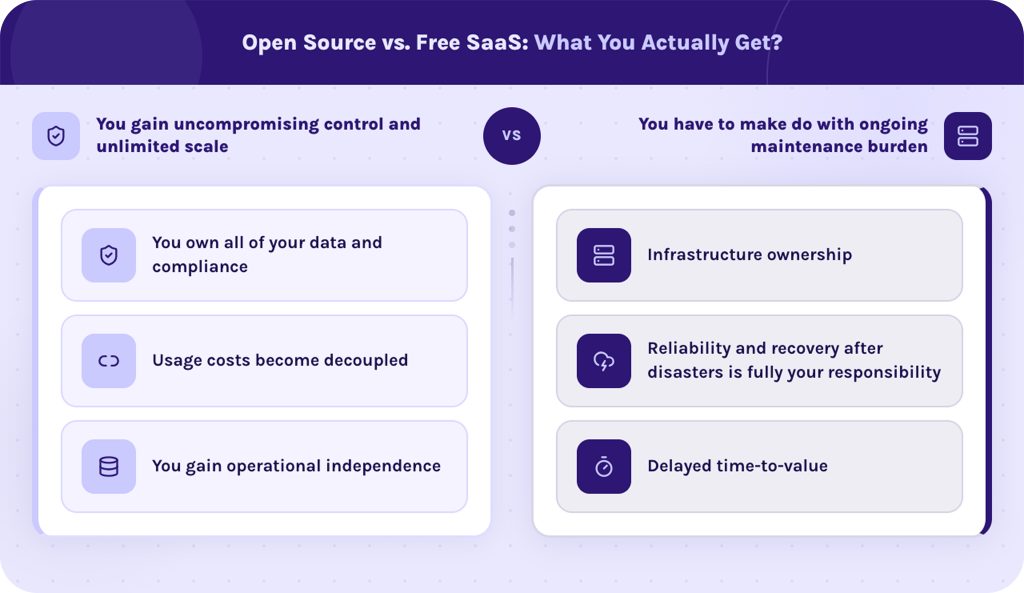
When you decide to implement free open source workflow automation tools into your workflows you need to understand advantages of this choice and hidden disadvantages you should be ready for. Choosing open-source or software versions for self-hosting gives you total sovereignty over your operations, but it transfers the entire operational load to your team.
You gain uncompromising control and unlimited scale.
- You own all of your data and compliance. Your API keys, customer PII, database credentials, and execution logs remain safely inside your private server environment. This eliminates third-party vendor risks and simplifies compliance with different requirements.
- Usage costs become decoupled. Self-hosted software scales at a flat infrastructure cost. You can execute tens of millions of automated tasks per month for the fixed price of your host server’s CPU and RAM.
- You gain operational independence. You have complete access to the source code. You can inject custom Python/TypeScript libraries, hook directly into internal microservices, or tweak the engine without running into artificial platform rate limits or paywalled features.
You have to make do with ongoing maintenance burden.
- Infrastructure ownership. Open source workflow automation tools that are free, only free to download, but not free to run. Your team is responsible for server provisioning (AWS, DigitalOcean, bare-metal), container management, network security, and TLS certificate renewal.
- Reliability and recovery after disasters is fully your responsibility. For example, if a database crashes, there is no vendor customer support to submit a ticket to. Managing backups and failures falls entirely on your engineers.
- Delayed time-to-value. Setting up an isolated self-hosted deployment with reverse proxies time and technical expertise compared to SaaS platforms.
If you decide to choose EpicStaff, our team will help you to handle all of these operational challenges seamlessly. We provide step-by-step deployment guidance and dedicated onboarding to ensure your self-hosted setup is secure.
Schedule technical consultation with our experts today.
Read More: AI in Project Portfolio Management: 7 Key Trends & Features
Self Hosting & Deployment Best Practices for Open Source Software
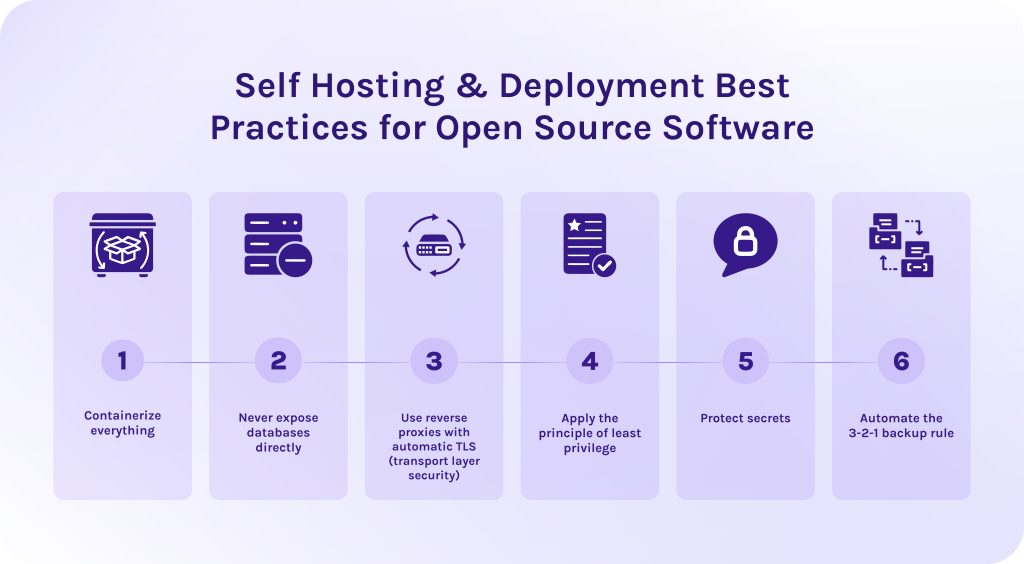
When deploying your selected open-source workflow automation tools, follow these rules to avoid security problems.
- Containerize everything. Deploy workflow automation tools using Docker or Podman containers. When you install dependencies directly on the host OS it doesn’t ensure the security. However, isolation and containerization guarantees consistent environments and simple dependency management.
- Never expose databases directly. Keep database containers (Postgres, MySQL, Redis) on isolated private docker networks. Only expose application ports locally to a reverse proxy.
- Use reverse proxies with automatic TLS (transport layer security). Do not expose raw application ports to the public internet. Use modern reverse proxies like Caddy, Traefik, or Nginx to handle HTTPS termination and web traffic routing.
- Apply the principle of least privilege. Ensure that containers run as non-root users with minimal Linux capabilities, keeping database ports strictly off public networks. This confines potential security breaches to the single compromised container and prevents an attacker from gaining full control of the host server.
- Protect secrets. Store API keys, tokens, database passwords (all sensitive information) in .env files or secret managers. Never hardcode them inside application images or source repositories.
- Automate the 3-2-1 backup rule. Maintain three copies of your stateful data across two different media types, with at least one encrypted snapshot stored off-site.
Read More: What Is Agentic AI in Healthcare and How Does It Work?
How To Choose the Right Workflow Automation Software for Your Team?
We’ll provide guidance on how to select open source workflow automation tools depending on your exact situation and use case.
- Choose EpicStaff for building advanced AI agent orchestration workflows that non-technical operations teams can monitor and manage, while developers can add custom functionality.
- Select n8n or Activepieces for dedicated app-to-app integration and SaaS automation. If we look at them separately, n8n is more suitable for a feature-rich platform with 400+ nodes, while Activepieces is for companies that need a lightweight, 100% open-source Zapier alternative.
- Apache Airflow or Dagster are both for companies seeking robust solutions for data engineering teams and large-scale ETL.
- For mission critical applications it is better to choose Temporal. It guarantees code runs to completion without losing execution state.
- Choose Camunda for enterprise business process management (BPM). It is a decent choice for enterprise architects, compliance teams, and organizations requiring formal, end-to-end process modeling.
- Windmill will be a perfect choice for turning scripts into tools and workflows. It is a go-to solution for developers and DevOps engineers who want to replace internal outdated tools.
- You should choose Node-RED if you need a dedicated workflow automation software oriented towards IoT and edge computing. Perfectly suits for hardware engineering teams.
- Wexflow will be a decent choice for system administrators and .NET environments that require a cross-platform background workflow engine.
Read More: The Best Autonomous AI Agents of 2026: Top Tools for Automation
Conclusion
In this article, we were talking a lot about workflow automation tools with open source nature. Let’s quickly sum everything up:
- Open source workflow automation tools are software solutions with the source code available for everyone to download for free and modify.
- Companies choose workflow automation tools with open code because then they avoid a vendor lock-in problem, can easily tailor such tools to their business, and, what’s more important, set up their own security measures and methods.
- To efficiently implement open source software for workflow automation, containerize everything, never expose databases directly, protect your sensitive data, and apply the principle of least privilege.
- Choose EpicStaff if you need advanced AI agent orchestration for both technical and non-technical users.
Don’t hesitate to explore EpicStaff’s capabilities already today. Visit our official website.
FAQ
1. What is the best open-source workflow automation tool?
There are no “the best” open source workflow automation tools. In fact, every tool serves different needs and covers different pain points.
- The tools that are considered to be the best generally: n8n, Zapier, EpicStaff.
- The best for engineering: Apache Airflow, Temporal, Node-RED.
- Best lightweight solutions: Wexflow, Windmill, Activepieces.
2. Is n8n really open source?
No, n8n is technically source-available or fair-code, rather than OSI-approved open source. It has a sustainable use license that lets you modify and self-host the code for free for internal business or personal use. However, it restricts companies from reselling or offering n8n as a commercial SaaS service.
3. What is the difference between a workflow engine and a workflow automation tool?
4. Is open-source workflow automation free?
It’s a common mistake to think that open-source workflow automation tools are completely free. While the source code itself is free to download and modify without license fees, the software is never entirely free to run. Organizations must still pay for host server infrastructure database hosting, data transfer costs, and the engineering labor required to maintain all processes.
5. Can I self-host workflow automation on my own server?
Yes, because all open-source and source-available workflow automation tools are designed for self-hosting on your own infrastructure. You can deploy them on private servers or virtual machines using containerization platforms like Docker.
6. What are the best open-source alternatives to Zapier?
One of the best open-source alternatives to Zapier is EpicStaff. It is an open-source AI agent orchestration platform for building advanced automated workflows. Its main distinguishing feature is its adaptability to almost any industry, starting from heavy regulated ones like manufacturing and telecom, ending by marketing and project management. It has functionalities for both software developers and non-technical specialists, so they can create and use workflows in collaboration.
7. Which open-source tool is best for AI agent workflows?
EpicStaff is considered to be one of the best open source workflow automation tools available on the market. It is built directly for AI-agent orchestration and multi-agent workflows. Moreover, it is suitable for both non-technical and technical specialists, making it one of the most versatile solutions in the market. It combines a Django backend with a visual node canvas, featuring native support for persistent vector memory (RAG) and human-in-the-loop review controls.
8. Do I need to know how to code to use these tools?
Not for all of them. Visual platforms like EpicStaff and n8n allow non-technical users to build workflows entirely without code using only drag-and-drop canvases. However, developer-focused workflow automation software tools like Apache Airflow or Temporal require programming skills in languages like Python or TypeScript.
9. How can I automate a workflow?
To automate a workflow you need to:
10. What software is used to create a workflow?
Workflow creation software ranges from visual SaaS automation platforms to developer-centric state machines and data orchestrators. They include EpicStaff, Zapier, Make, Activepieces, n8n, Temporal, and Apache Airflow. Additionally, many modern work management suites such as Asana feature built-in workflow engines to automate project routines.
References
1. “How Much Time Are You Wasting on Manual, Repetitive Tasks?” Retrieved from:
https://www.smartsheet.com/content-center/product-news/automation/workers-waste-quarter-work-week-manual-repetitive-tasks
2. https://www.academia.edu/1725970/Workflow_Automation_Applications_Technology_and_Research
3. “Economic Benefits of Free and Open Source Software: An Evaluation for Health Sector” Retreived from:
https://www.researchgate.net/publication/274947660_Economic_Benefits_of_Free_and_Open_Source_Software_An_Evaluation_for_Health_Sector
4. EWLS, Free Software / Open Source: Information Society Opportunities for Europe? 2000, European Working group on Libre Software. Retrieved from:
http://eu.conecta.it/paper.pdf
5. “No-Code AI Automation Combining n8n with Agentic AI” Retrieved from:
https://www.researchgate.net/publication/398935906_No-Code_AI_Automation_Combining_n8n_with_Agentic_AI
6. Boyer M. and Robert J. (2006) The Economics of Free and Open Source Software: Contributions to a Government Policy on Open Source Software, CIRANO, www.cirano.qc.ca/pdf/publication/2006RP-03.pdf
7. Lee M. (2010) What is Free Software and Why is It So Important For Society?, Free Software Foundation (FSF). http://www.fsf.org/about/what-is-free-software
8. D. Kalla and N. Smith, “Integrating IoT, AI, and Big Data for Enhanced Operational Efficiency in Smart Factories,” Educational Administration: Theory and Practice, 2024.
https://www.researchgate.net/publication/381960986_Integrating_Iot_AI_And_Big_Data_For_Enhanced_Operational_Efficiency_In_Smart_Factories_Educational_Administration_Theory_and_Practice