
![Stop Guessing, Start Scaling: Top 8 Capacity Planning Software [2026]](https://www.hys-enterprise.com/wp-content/uploads/Stop-Guessing-Start-Scaling_-Top-8-Capacity-Planning-Software-scaled.jpg)
Key takeaways
- Capacity planning is a project management activity meant to determine future resource requirements and ensure an organization has the necessary bandwidth and skills to successfully deliver upcoming projects on time and within budget.
- Capacity planning software helps companies of different scales automate the forecasting, allocation, and tracking of resources to structure company processes.
- Capacity planning solves overallocation (when team members are assigned to more activities than they can actually handle) and underbooking (when employees have too much free time, which wastes budget) problems.
Read More: 10 AI Project Management Tools to Pay Your Attention to in 2026
What is capacity planning software?
Capacity planning software is an advanced digital platform designed to plan, forecast, manage, and properly allocate your company’s resources to drive maximum efficiency. At the same time, this software helps managers allocate limited resources in a way that prevents two major problems:
- Overallocation – situation when team members or assets are assigned more work than their actual available hours or capabilities allow. It, consequently, causes project delays and employee burnout.
- Underutilization – situation when valuable resources sit idle or operate far below their total capacity. It, in turn, leads to wasted budget and missed revenue opportunities.
Read More: The Next Generation of PMO Tools: How to Choose the Perfect One for You
What is the difference between capacity planning, capacity management, and resource planning?
These terms are often considered the same in project management. However, they actually operate at completely different altitudes and time horizons.
- Capacity planning – it’s a long-term process of forecasting future project demand against the available skills and hours of your employees. You need it to determine if an organization has the overall bandwidth to accept upcoming work.
- Capacity management – it is, in turn, a continuous process of monitoring real-time team utilization. It helps compare planned versus actual hours worked to adjust workloads and eliminate current operational bottlenecks.
- Resource planning – it is, on the contrary, a short-term process of scheduling and allocating specific tasks to exact employees based on their current availability.
Want to know more about the latest software development trends and most popular tools? Subscribe to our blog using the button on your right-hand to stay aligned with updates.
Read More: Product Portfolio Management Tools: Complete Guide to Choosing the Best Solution in 2026
What features to look for in capacity planning software?
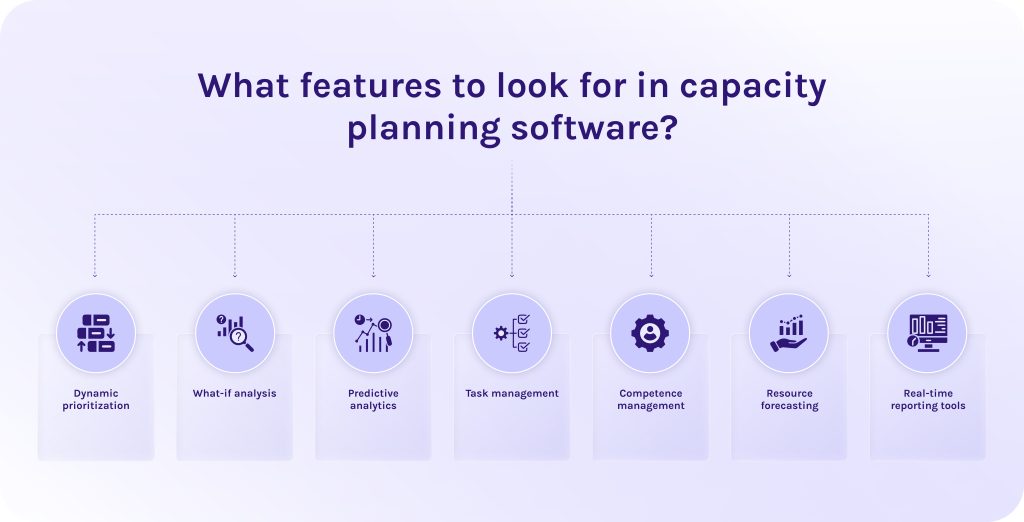
When we are already familiar with the definition of a capacity planning tool and know how it differs from other activities related to a company’s resources, it’s time to take a look at the features every advanced forecasting capacity planning software should have.
- Dynamic prioritization. This is an essential feature in capacity planning software as it automatically ranks projects and resource requests based on business value or ROI when capacity constraints arise.
- What-if analysis. Thanks to this capacity planning tool, you can test different hypotheses about project changes in a safe environment. It provides an isolated sandbox to simulate shifts in timelines or sudden changes in headcount.
- Predictive analytics. This feature for capacity planning uses historical delivery data and past experience to forecast future capacity constraints and project timelines.
- Task management. Thanks to this feature for capacity planning, you can connect high-level capacity plans directly to daily operational execution (to-do lists, milestones, and KPIs).
- Competence management. This capacity planning tool manages individual skills of all your employees, their certifications, and experience to assign them right to the tasks they surely can handle.
- Resource forecasting. Predictive algorithms in capacity planning software foresee future supply against future demand.
- Real-time reporting tools. Continuously track live metrics like actual vs. planned hours or resource utilization rates across the entire portfolio.
Read More: What is Program Management? A Deep Dive into Strategic Success and Program Leadership
Why should you trust our capacity planning software reviews?
Every time we create a new software ranking, we don’t do paid partnerships. We do our own research, using public data and verified reviews. Thus, to create this list of capacity planning software options, we developed the following estimation criteria:
- Best for: We define where each capacity planning tool shows itself the best. Whether it is built for a small agency or heavy enterprise workflows, we’ll notice and write about it.
- Industries: We discovered for what environments the software for capacity planning was initially designed. It helps us to understand whether the software is compatible with your specific workflows.
- User reviews from Capterra, SoftwareAdvice, and G2: We review the most popular platforms with real user reviews to analyze patterns in customer sentiment over months of active use.
- Real-world use cases: We look at how the capacity planning tool solves actual operational headaches. We analyzed official websites of each tool to find success stories from real clients to ensure that marketing reflects reality.
- Pricing transparency: We grade capacity planning software options on how clear they are with their costs. We highlight whether they offer transparent per-user monthly pricing or have hidden costs for advanced features or licences.
- Core features: We check capacity planning tools for the presence and execution of critical capabilities like predictive analytics, resource management, competence management, what-if scenario planning, etc.
- Pros: When there is something good that we want to highlight in our competitors, we definitely do it. We pinpoint where the capacity planning tool genuinely excels and beats out the competition.
- Cons: As well, we want to be honest about pain points and not be prejudiced. If a capacity planning tool has a steep learning curve or requires heavy manual data maintenance, we call it out explicitly.
Read More: Tired of MS Project? 16 MS Project Alternatives for Modern Teams
Best capacity planning software: table of comparison
| Capacity planning tool | Best for | Pricing | User reviews |
| Epicflow | Multi-project management in companies where resources are always constrained. | Growth: €22.5 monthly/billed annually.
Enterprise: has custom pricing. |
Capterra: 5/5
SoftwareAdvice: 5/5 G2: 4.4/5 |
| Kantata | PSOs and consultancies that need real-time visibility into project profitability. | Is available only upon a request. | Capterra: 4.2/5
SoftwareAdvice: 4.2/5 G2: 4.2/5 |
| Productive | Small to mid-sized agencies that want multiple advanced capacity planning features into a single tool. | Essential: $10/month.
Professional: $25/month. Ultimate: custom pricing |
Capterra: 4.6/5
SoftwareAdvice: 4.6/5 G2: 4.6/5 |
| Monday.com | Cross-functional organizations that want a highly visual capacity planning tool. | Free: €0.
Basic: €9 seat/month. Standard: €12 seat/month. Pro: €19 seat/month. Enterprise: custom pricing. |
Capterra: 4.6/5
SoftwareAdvice: 4.6/5 G2: 4.7/5 |
| Parallax | Mid-market organizations that want sophisticated pipeline forecasting without abandoning their already existing software. | Is available only upon a request. | Capterra: 4.4/5
SoftwareAdvice: 4.4/5 G2: 4.7/5 |
| ClickUp | Teams and scaling businesses that want an affordable capacity planning tool to handle day-to-day project execution. | Free: $0 forever.
Unlimited: $7 per user/month. Business: $12 per user/month. Enterprise: custom pricing. |
Capterra: 4.6/5
SoftwareAdvice: 4.6/5 G2: 4.6/5 |
| Skedulo | Managing and scheduling mobile and field-based workforces. | Is available only upon a request. | Capterra: 4.5/5
SoftwareAdvice: 4.5/5 G2: 4.1/5 |
| Celoxis | Mid-to-large enterprise PMOs and professional services organizations. | Core: starts from $10.
Essentials: starts from $25. Professional: starts from $35. Business: starts from $45. Enterprise: custom pricing. |
Capterra: 4.4/5
SoftwareAdvice: 4.4/5 G2: 4.6/5 |
Read More: Best Engineering Project Management Tools: Complete Guide & Comparison
What are top capacity planning software options? Detailed reviews
1. Epicflow
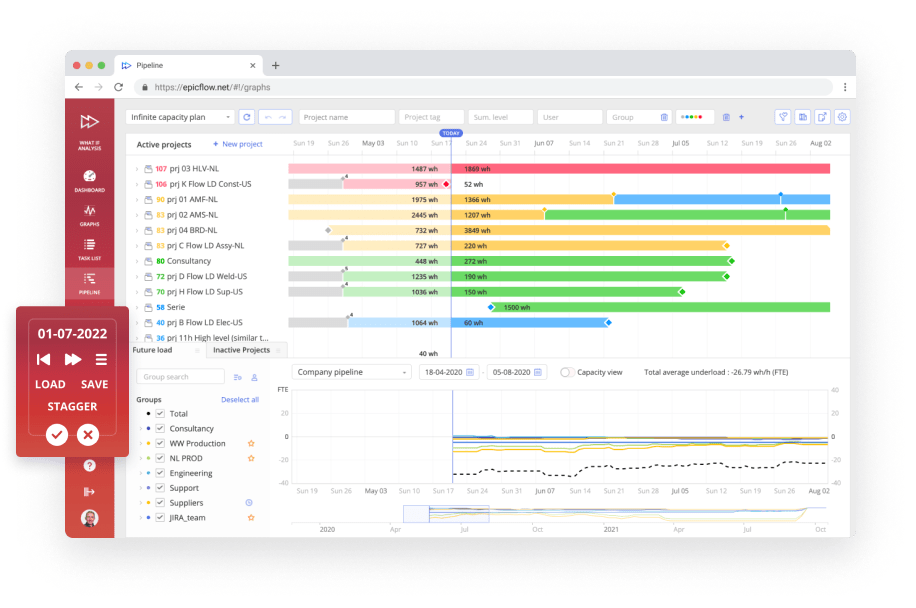
Epicflow heads our list as one of the best capacity planning software for companies that operate within highly regulated industries. It is designed to help organizations manage multiple projects simultaneously in environments where a single, shared resource pool is constantly stretched across overlapping timelines.
Best for
Complex project and portfolio management in companies where resources are always constrained.
Industries
- Automotive.
- Aerospace and defense.
- Software development.
- Telecommunications.
- Pharmaceutical.
- Government.
- Manufacturing.
Core features
- What-if scenario planning. Managers can simulate different possible scenarios of their actions. You can test what is likely to happen if you, for example, move the lead developer from one project to another.
- AI-powered portfolio optimization. The system constantly analyses the environment and dynamically reprioritizes projects and tasks according to their current business value.
- Competence management. An internal database that tracks team members by specific skills, certifications, and experience levels to ensure the right person gets placed on the right task.
Pros
- Has a free 30-day trial so you can test the tool before making a final decision.
- Has integrations with other resource planning tools, like Jira, MS Project, Primavera, and SAP.
- Eliminates resource overload by looking at actual resource availability.
- Predictive algorithms can forecast resource deficits in advance.
Cons
- Has a steep learning curve.
- Some advanced data visualizations can feel cluttered and confusing to interpret.
- Requires “price upon a request” for enterprise plans.
Pricing
- Growth: €22.5 monthly/billed annually.
- Enterprise: has custom pricing. You should contact the vendor directly.
Reviews
- Capterra: 5/5
- SoftwareAdvice: 5/5
- G2: 4.4/5
If you’re interested in partnering with Epicflow, contact us directly to estimate what features you might need and how to implement this capacity planning tool into your business without frustration.
2. Kantata
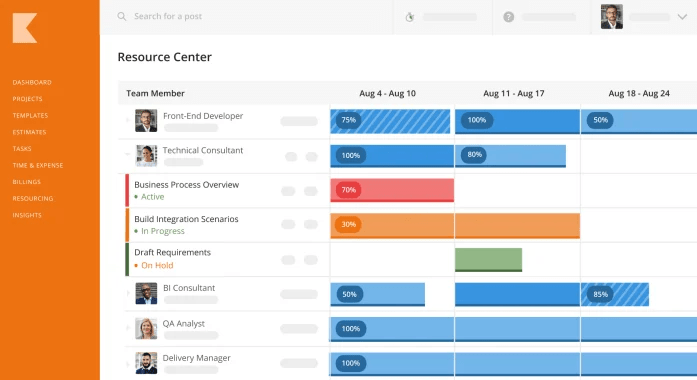
The second capacity planning solution on our list establishes itself as the premier choice for organizations that need to tie capacity planning directly to project finances. Unlike other resource planning tools, Kantata perceives every working hour as a financial asset, tightly integrating resource allocation, time tracking, and margin analysis into a single platform.
Best for
Professional services organizations (PSOs) and consultancies that need real-time visibility into project profitability and complex workforce allocation across multiple global accounts.
Industries
- IT services.
- Management consulting.
- Agencies.
- Software and Hi-Tech.
Core features
- Integrated professional services automation (PSA). This feature unifies project delivery and smart resource allocation so that scheduling changes immediately update project margin forecasts.
- Predictive financial forecasting. Displays live revenue tracking so managers can see how delays or resourcing shifts impact the bottom line.
- Kantata AI agents. Autonomous AI agents that provide intelligent workload recommendations and generate automated health reports.
Pros
- Combines scheduling with live financial tracking.
- Reduces cost leakage.
- Boosts resource utilization.
- Offers native deployment directly onto the Salesforce platform.
Cons
- Everyday tasks can feel tedious, requiring multiple clicks to execute.
- Has a steep entry price point.
- Can feel overwhelming for smaller teams.
Pricing
Is available only upon a request.
Reviews
- Capterra: 4.2/5
- SoftwareAdvice: 4.2/5
- G2: 4.2/5
3. Productive
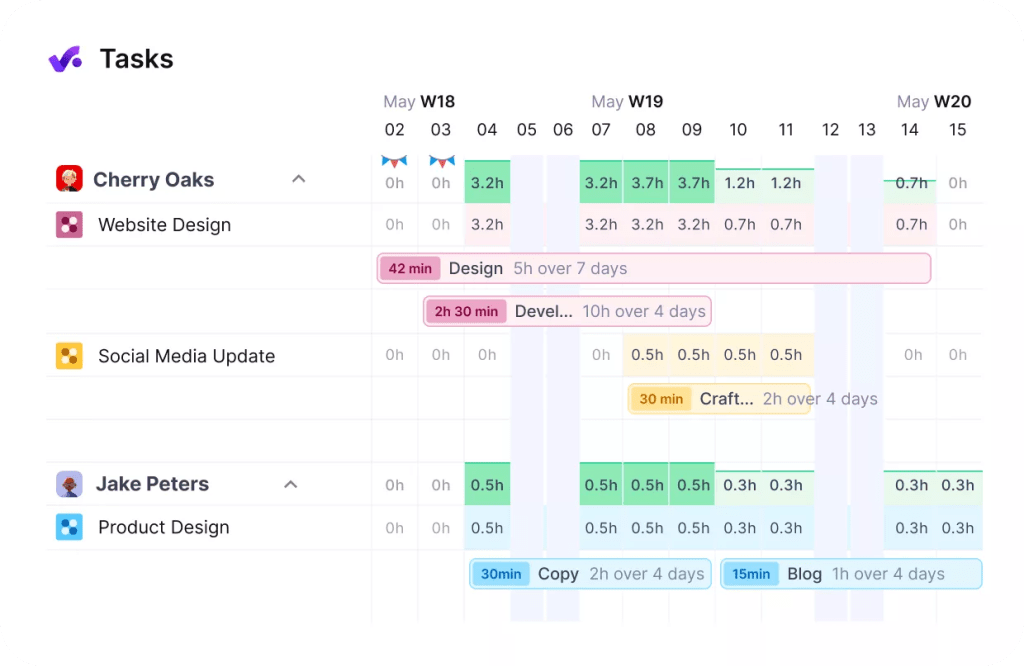
This capacity planning tool combines intuitive, day-to-day project management and time tracking with clear resource capacity planning, which makes it incredibly accessible for fast-moving teams.
Best for
Small to mid-sized creative and dev agencies that want multiple advanced capacity planning features into a single tool without a chaotic setup process.
Industries
- Accounting and finance.
- Consultancy.
- Architecture and engineering.
- Agency.
- IT services.
- Software and Hi-Tech.
Core features
- Heatmap scheduling. A visual timeline dashboard that immediately highlights which team members are overbooked, under-utilized, or scheduled for upcoming paid time off (PTO).
- Real-time profitability reporting. This feature in resource planning software automatically links logged hours and resource salaries against fixed-price or hourly budgets.
- Integrated billing and invoicing. Ultimately, this capacity planning feature generates client invoices with a single click.
Pros
- Eliminates the hidden costs and messy data connections.
- Allows agencies to invite clients into specific project spaces to review timelines and tracking data.
- It has a modern user interface.
Cons
- Some advanced tracking views can feel slightly disjointed when switching between desktop and mobile apps.
- Can feel overwhelming and tedious.
Pricing
- Essential: $10/month.
- Professional: $25/month.
- Ultimate: custom pricing.
Reviews
- Capterra: 4.6/5
- SoftwareAdvice: 4.6/5
- G2: 4.6/5
4. Monday.com
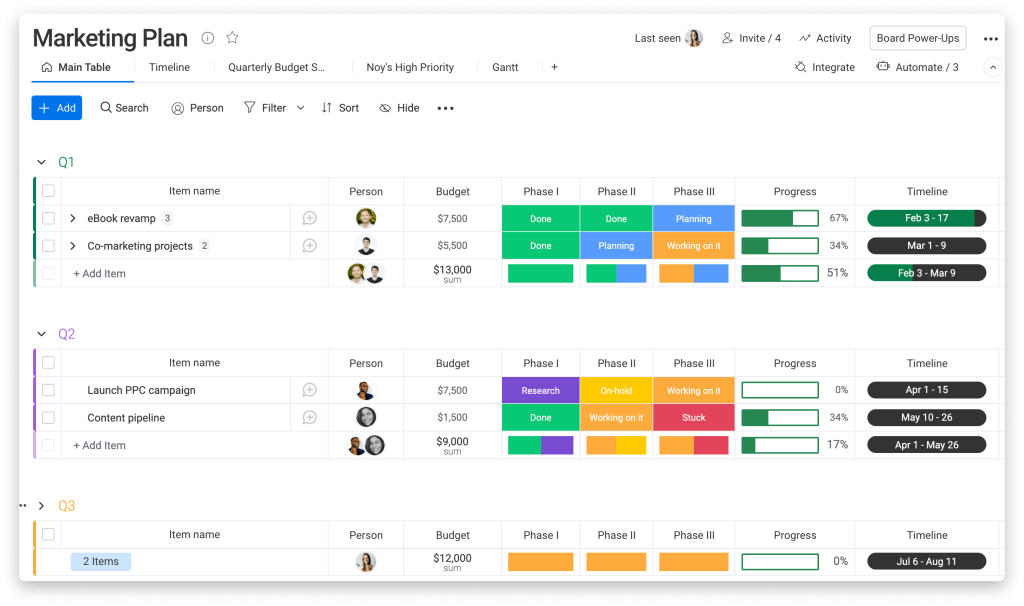
Monday.com secures the fourth spot on our list. This capacity planning tool is widely recognized for its unparalleled flexibility and highly visual approach to work management. It leverages fully customizable boards and visual widgets so that teams can easily construct custom resource management workflows tailored to their unique needs.
Best for
Cross-functional organizations and fast-growing teams that want a highly visual capacity planning tool.
Industries
- Media.
- Retail.
- Government.
Core features
- No-code workflows. Capacity planning tool that gives you the ability to automate some of routine tasks, such as automatically shifting task ownership when an employee’s capacity breaches 100%.
- The workload view. A visual resource timeline that dynamically shows every team member’s weekly or monthly capacity.
- Custom boards. Thanks to this feature, you can link multiple separate tracking sheets into a unified executive dashboard.
Pros
- Has a forever free version.
- Integrates seamlessly with lots of project management tools, for instance, with Slack, Microsoft Teams, Google Workspace, Jira, and Salesforce.
- Easy adoption and low learning curve.
- Seamless team collaboration.
Cons
- Lacks some advanced features, like deep financial forecasting.
- Can become slow as workflows and data volumes grow.
Pricing
-
- Free: €0 – forever free.
- Basic: €9 seat/month.
- Standard: €12 seat/month.
- Pro: €19 seat/month.
- Enterprise: custom pricing. You should contact the vendor directly.
Reviews
- Capterra: 4.6/5
- SoftwareAdvice: 4.6/5
- G2: 4.7/5
5. Parallax
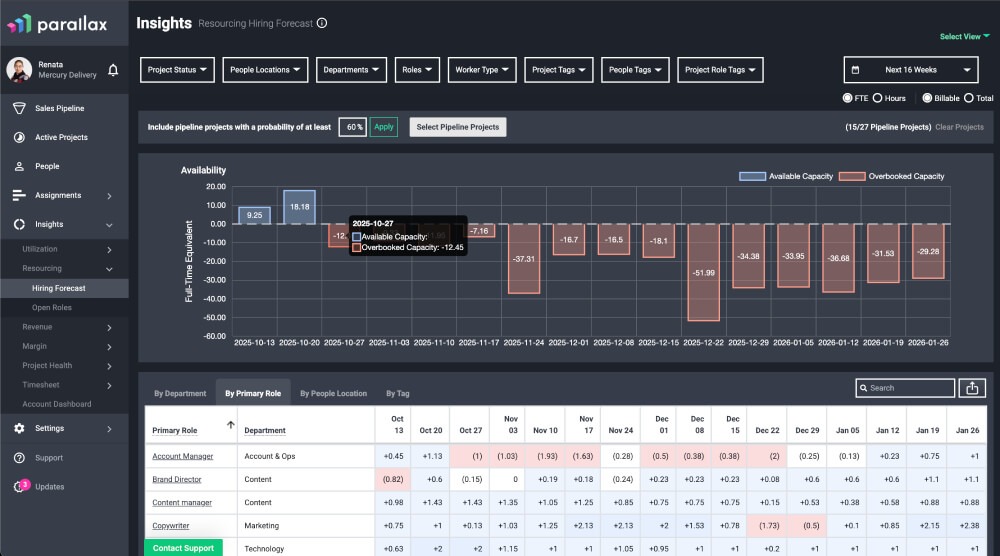
The philosophy of this capacity planning software is that you don’t have a resource problem, you have a planning problem. Other solutions that we were discussing earlier, often try to force you to migrate to their native all-in-one workspaces, while Parallax leaves your existing workflows completely untouched. This capacity modeling software operates as an intelligent forecasting layer that sits over the tools your company already uses and pulls data automatically.
Best for
Mid-market organizations that want sophisticated pipeline forecasting without abandoning their favorite daily execution apps.
Industries
- Digital agencies.
- IT consultancies.
- Software engineering companies.
- Corporate marketing and creative services.
Core features
- CRM pipeline integration. Lets you get information directly from CRM systems into your operation’s software to model relevant resource capacity.
- Predictive utilization modeling. Tracks historical project hours against live schedules to accurately forecast utilization rates.
- Continuous margin control. This capacity planning tool runs automated calculations in the background comparing live project burn rates against initial estimates to prevent financial leakage.
Pros
- As it integrates with your current software, employees won’t need to adjust to a completely new project environment.
- Gives leadership warnings of which skills they need to hire next.
- Hands-on onboarding process.
Cons
- If your underlying systems are messy or poorly maintained, Parallax’s forecasts will quickly lose accuracy.
- Data synchronization can occasionally experience lag.
Pricing
Is available only upon a request.
Reviews
- Capterra: 4.4/5
- SoftwareAdvice: 4.4/5
- G2: 4.7/5
6. ClickUp
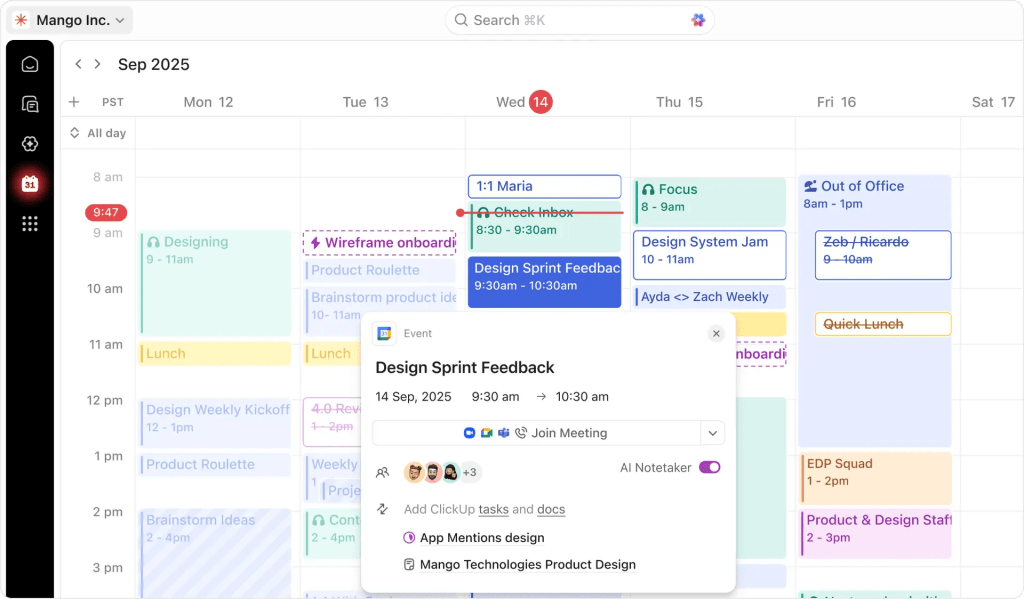
ClickUp is one of the best workforce capacity planning tools present in the market. It is a highly customizable solution designed to replace fragmented software stacks entirely. The main strength of this capacity planning tool is that it helps managers to stay focused on strategic activities and not jump between separate platforms to figure out who is doing what.
Best for
Teams and scaling businesses that want an affordable capacity planning solution to handle day-to-day project execution.
Industries
- Government and public sector.
- Technology and software.
- Education.
- Media and creative.
- Construction.
- Retail and eCommerce.
- Legal.
- Real estate.
- Manufacturing.
- Healthcare.
- Nonprofit.
- Finance and accounting.
Core features
- ClickUp Brain AI. Context-aware AI teammates capable of doing different capacity planning activities, like reviewing project backlogs.
- Dual level workload view. A visual scheduling grid that allows managers to group capacity simultaneously by broader departments/squads and down to individual team members.
- Native connected search. A search tool that can actively index and find documents, task files, and communications stored across connected external systems.
Pros
- Eliminates the need for separate subscriptions to different third-party tools.
- Can handle complex data architectures and large task matrices.
- Provides access to advanced capacity planning features for the per-user cost.
Cons
- Smaller teams can face a steep learning curve and difficulties while setting up.
- Essential capacity management tools are locked entirely out of lower tiers, forcing teams to buy the Business plan.
Pricing
- Free: $0 forever.
- Unlimited: $7 per user/month.
- Business: $12 per user/month.
- Enterprise: custom pricing. You should contact the vendor directly.
Reviews
- Capterra: 4.6/5
- SoftwareAdvice: 4.6/5
- G2: 4.6/5
7. Skedulo
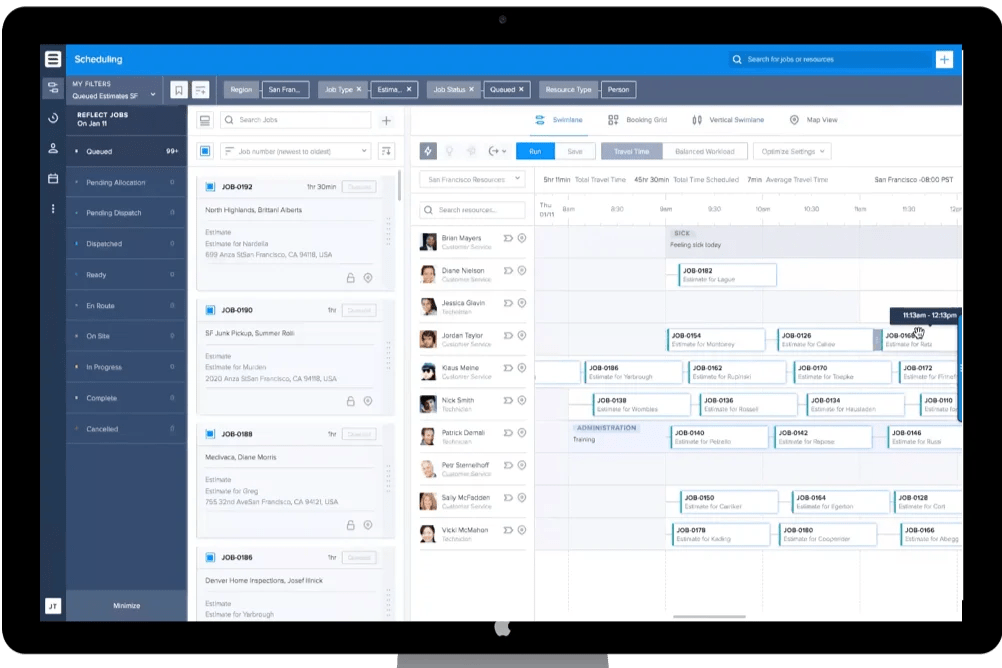
Skedulo is an enterprise-grade scheduling and workforce forecasting engine built specifically for the mobile teams. What distinguishes this manufacturing capacity planning software from the others is that it manages the logistics of getting the right person to the right physical location at the exact right time.
Best for
Managing and scheduling mobile and field-based workforces that require complex matching of physical locations and skills.
Industries
- Telecommunications.
- Residential services.
- Healthcare.
- Energy and utilities.
- Nonprofit.
- Real estate.
- Public sector.
Core features
- Intelligent scheduling engine. This capacity planning feature automatically pairs jobs with field technicians or remote workers using AI-powered logic.
- Built-in route optimization. The capacity planning tool uses GPS and dynamic mapping to map out the most efficient travel paths for field reps.
- Mobile app that is capable of working offline. Field workers can update job statuses or fill out forms on-site, fill out forms on-site
Pros
- Mobile app gives workers on-the-go tool to handle day-to-day tasks.
- Can manage complex scenarios.
- Offers great developer APIs and informative data schemas.
Cons
- This software for capacity planning has a steep learning curve.
- Can suffer from slow load times.
Pricing
Is available only upon a request.
Reviews
- Capterra: 4.5/5
- SoftwareAdvice: 4.5/5
- G2: 4.1/5
8. Celoxis
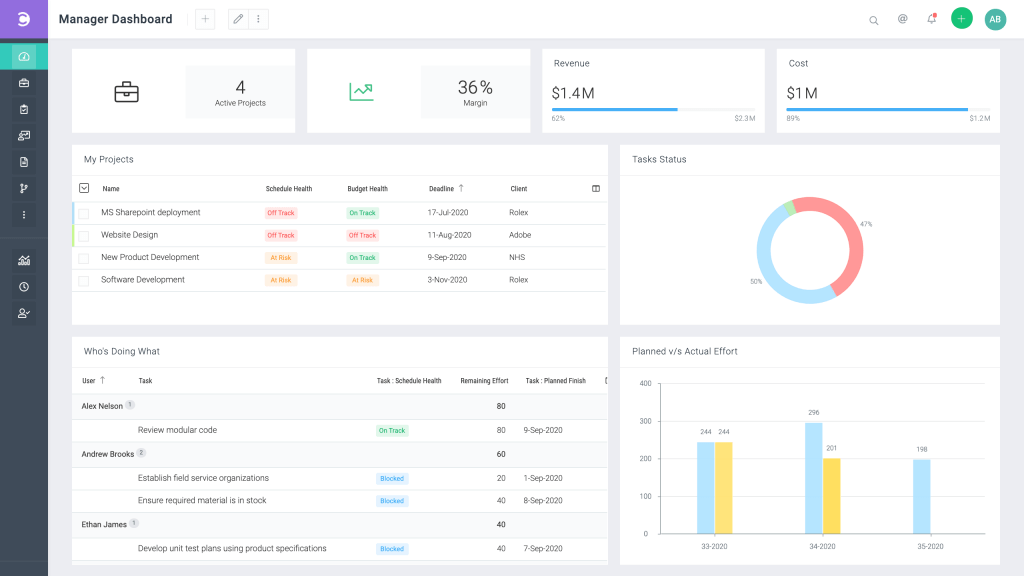
Compared to other team capacity planning tools on this list, Celoxis wins on heavy-duty engine performance. It is a project portfolio management (PPM) system built for companies that need to tightly couple resource capacity with deep financial analytics and complex multi-project governance. It analyzes whether the resources are utilized efficiently and how a delay on one task impacts the entire corporate portfolio.
Best for
Mid-to-large enterprise PMOs and professional services organizations that require heavy-duty project portfolio management (PPM) alongside deep financial forecasting.
Industries
- Information technology and enterprise software.
- Healthcare.
- Financial services and banking.
- Aerospace and defense.
- Engineering.
Core features
- Real-time workload charts. This forecasting capacity planning software dynamically tracks and displays resource loads and employee efficiency across the entire company portfolio.
- Automatic resource scheduling. Also this capacity planning tool automatically adjusts project schedules based on real-world constraints.
- Financial forecasting. This feature links resource hours directly to project budgets.
Pros
- Eliminates the need for standalone tools.
- Excels at handling massive portfolios.
- Managers can oversee dozens of projects simultaneously.
Cons
- The depth of advanced features leads to a steep learning curve.
- User interface isn’t minimalistic enough and can feel overwhelming for some users.
Pricing
- Core: starts from $10 per standard user.
- Essentials: starts from $25 per standard user.
- Professional: starts from $35 per standard user.
- Business: starts from $45 per standard user.
- Enterprise: custom pricing. You should contact the vendor directly.
Reviews
- Capterra: 4.4/5
- SoftwareAdvice: 4.4/5
- G2: 4.6/5
How to choose your perfect capacity planning tool?
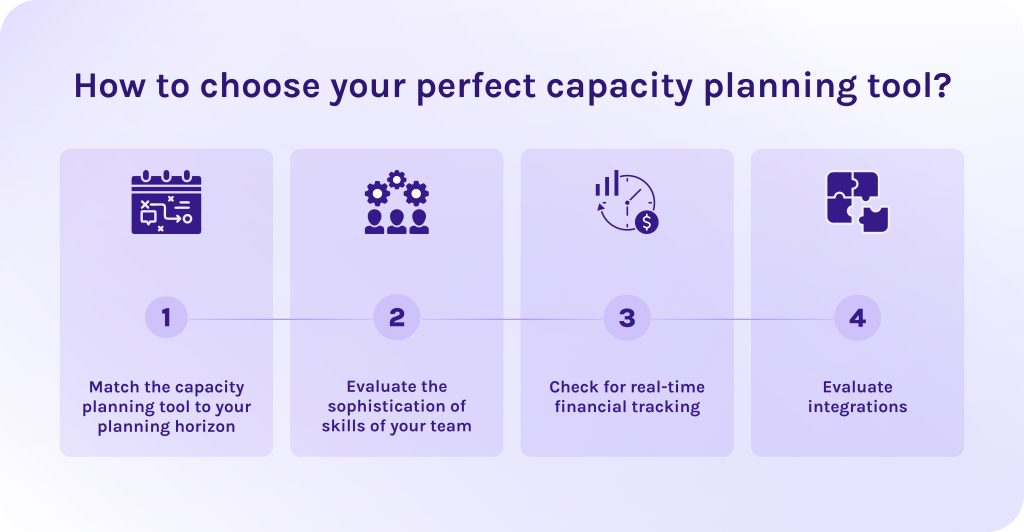
Choosing the right capacity planning tool comes down to matching the software’s capabilities with your team’s operational complexity.
1. Match the capacity planning tool to your planning horizon.
Understand for how long you need the capacity planning tool. Because long term and short-term options serve absolute different purposes:
- Short-term: If your main struggle is figuring out who is working on what this week, look for capacity planning software with robust visual drag-and-drop resource scheduling and real-time utilization heatmaps.
- Long-term: If you need to plan hiring budgets and project intake 6-18 months out, prioritize capacity planning software options that offer role-based placeholders and “what-if” scenario modeling.
2. Evaluate the sophistication of skills of your team.
A capacity planning tool is only as good as its ability to find the right person for the job. If your team is highly specialized, you need a platform with advanced skills-tagging. For generalist teams, a simpler system that tracks capacity purely by department or role will prevent unnecessary administrative clutter.
3. Check for real-time financial tracking.
Capacity and profitability are deeply linked. If you manage client-facing or billable work, choose a tool that integrates time tracking with financial analytics. It should calculate scheduled vs. actual time, track billable vs. non-billable hours, and provide clear forecasts on project margins so you can spot unprofitable work before it hurts your bottom line.
4. Evaluate integrations.
Decide how the tool will fit into your existing software ecosystem. If you already use robust project management platforms (like Jira or Asana), look for a specialized capacity planning tool with seamless, two-way integrations. If your workflow is fragmented, an all-in-one project portfolio management (PPM) system might be better, though it will come with a steeper learning curve for your team.
Read More: 3 Essential Types of Capacity Planning Strategies and When to Use Them
Final words about capacity planning software
I want to finish this article with a self-explanatory quote:
“Working at maximum capacity is a bad thing and can lead to slower release cycles, burn out and more stress… I believe that teams which plan to their effective capacity are more flexible, less stressed and deliver better.”
Peter Lafferty
No matter which industry you’re operating in or how big your company is. Without proper capacity planning, teams are likely to waste their resources surprisingly fast and later wonder what exactly went wrong. However, with the help of the right capacity planning software, you can not only keep the acceptable levels of productivity, but increase efficiency and profitability.
If you’re looking for a reliable capacity planning tool, draw your attention to Epicflow. Contact our experts to understand if this solution can increase the efficiency of your workflows and boost your ROI.
Frequently asked questions about capacity planning software
1. What is capacity planning software?
Capacity planning software is a tool that analyzes and models your team’s total available work hours against current and upcoming project demands. It ensures that work is distributed efficiently. Additionally, such resource planning software automatically flags who is overbooked or underutilized, helping organizations prevent team burnout and predict exactly when they need to hire more staff.
2. What tools are available for capacity planning?
- Epicflow – Best for multi-project environments with constrained resources.
- Kantata – Best for professional services enterprises needing to tie capacity directly to project financials and margins.
- Productive – Best for mid-sized agencies looking for an all-in-one tool.
- Monday.com – Best for growing teams needing a highly customizable workload tracker.
- Parallax – Best for digital agencies that want to pull pipeline data from their CRM to forecast hiring needs.
- ClickUp – Best for multi-departmental teams.
- Skedulo – Best for mobile workforces with complex field service scheduling.
- Celoxis – Best for large enterprises requiring deep project portfolio management (PPM).
3. What tools help with R&D capacity planning?
The tools that can help you with R&D capacity planning are Epicflow, Planview, Celoxis, and Jira.
4. What is capacity planning in ERP?
Overall, capacity planning is a process of balancing your production schedule with your real-world resource constraints. On the one hand, it can be physical resources like machinery or equipment, but on the other hand, it can be people, knowledge, software, skills, data. It helps properly allocate available resources to avoid overbookings and underutilization.
5. What are the four steps of capacity planning?
- Step #1 Forecast future demand. Analyze your upcoming projects, market trends, and historical data to estimate exactly how much time and resources will be required over a defined period.
- Step #2 Calculate current capacity. Review your current resources for available time and skills to understand realistic utilization rates.
- Step #3 Evaluate gaps between what you have and what you need. Compare forecasted demand against calculated capacity to identify bottlenecks or talent shortages.
- Step #4 Adjust and implement. Ultimately, adjust your resources to needed capacity. Hire extra talent or change timelines if required.
6. How capacity planning tools prevent team burnout?
- They visualize true team capacity. They map out a team member’s actual hours or complexity of assigned tasks in real time, so every inefficiency can be seen immediately.
- They prevent double-bookings. The capacity planning tool tracks shared resource pools across all active projects simultaneously, so managers are protected from accidentally scheduling the same person for overlapping deadlines.
- What-if analysis. Before taking on a new project, leadership can simulate the extra work in a sandbox environment to see exactly how it affects team stress levels.
7. How do you create a capacity plan?
To create a capacity plan, you must first calculate your team’s actual available work hours and forecast the total demand of your upcoming project pipeline. Once you compare the two to identify resource gaps, you can proactively hire or reallocate tasks to keep your workloads perfectly balanced.
8. Is capacity planning the same as resource management?
No. Even though they are closely related, these are processes that operate at different levels.
- Capacity planning is a strategic process of analyzing available resources and their ability to cover future demand.
- Resource management is the tactical process of scheduling and assigning specific individuals to day-to-day tasks.
9. What are examples capacity planning?
Imagine that an IT firm uses capacity planning to scale up cloud server bandwidth right before a massive retail holiday rush to prevent website crashes. Similarly, a creative agency maps out its design team’s available hours to ensure they can take on a new product launch without causing employee burnout or missing deadlines.
10. Can you do capacity planning in Excel?
Yes, you can use Excel for capacity planning as it allows you to build custom resource templates with pivot tables and conditional formatting. However, unfortunately, it lacks live data syncing, requiring heavy manual updates, consequently, quickly becoming error-prone.
References
- https://www.runn.io/blog/resource-management-statistics
- https://www.researchgate.net/publication/230285584_Capacity_Planning
- https://www.researchgate.net/publication/388859247_THE_EFFECT_OF_CAPACITY_PLANNING_ON_SUPPLY_CHAIN_PERFORMANCE_OF_MANUFACTURING_FIRMS
- https://www.researchgate.net/publication/223616425_The_challenges_of_capacity_planning
- https://www.researchgate.net/publication/3426592_Capacity_planning_An_essential_tool_for_managing_Web_services
- https://www.researchgate.net/publication/388478866_Capacity_Planning_in_Cloud_Computing_A_Site_Reliability_Engineering_Approach_to_Optimizing_Resource_Allocation
- https://www.researchgate.net/publication/229215223_Contingency_theory_of_capacity_planning_The_link_between_process_types_and_planning_methods
- https://www.researchgate.net/publication/358613159_Capacity_planning_and_production_scheduling_integration_improving_operational_efficiency_via_detailed_modelling