
Key takeaways
- An AI agent is autonomous software that is designed to perceive environments, reason, and act on its own. They have emerged as a solution to meet increasing demand for automation and intelligent decision-making [8].
- Their role has expanded drastically since the demand for business process automation grows exponentially. According to recent industry data, the market for business workflow automation is expected to expand at a 12.37% annual rate over the next eight years, growing from $22.3 billion in 2026 to $56.68 billion by 2034 [7].
- AI agent frameworks need quality data to rely on while learning. For this purpose, provide trusted and accurate data sources for training and benchmarking agentic reasoning.
- The architecture of agent frameworks includes four core components: LLMs (the brain of workflow execution), prompts or other instructions, data sources to train and learn information from, and, finally, memory and an execution loop.
- AI agent frameworks are the key to the question “How to build AI agents?” Tools like EpicStaff provide a visual interface and advanced customizations needed to build secure and efficient workflows.
- AI agent use cases include building a logistics AI-first platform called “Move Your Machine”.
What Is an AI Agent?
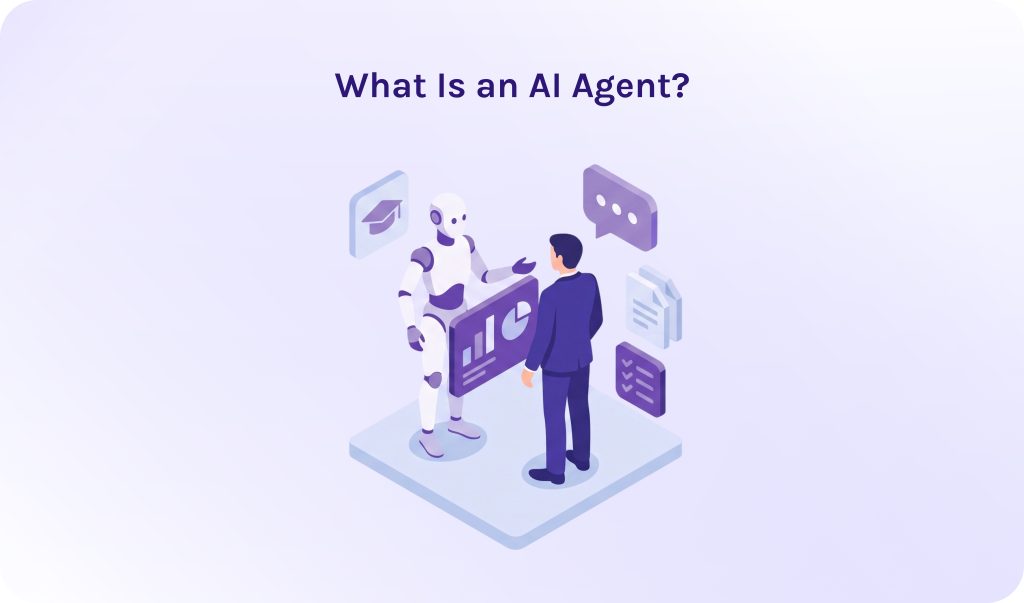
An AI agent is an autonomous software entity that acts like a real team member, being able to handle complex tasks and make important decisions on its own. They can analyze the environment they are working in, plan next steps, identify bottlenecks, and find solutions to solve them. One more essential capability is that AI agents can remember context and data they learned during task execution.
The best example of an AI agent I can recall is JARVIS from “Iron Man”, strange as it may sound. J.A.R.V.I.S. is the ultimate mental model for an AI agent, precisely because Tony Stark doesn’t talk to him like a search bar; he talks to him like a trusted chief operating officer. He can remember previous conversations, do research on his own, show only reliable results, analyze bottlenecks, and give pieces of advice on how to get rid of them. JARVIS is actually the gold standard for how most people conceptualize AI agents.
Read More: Mastering AI Agent Orchestration for Complex Workflows
AI Agents vs. AI Agent Workflow
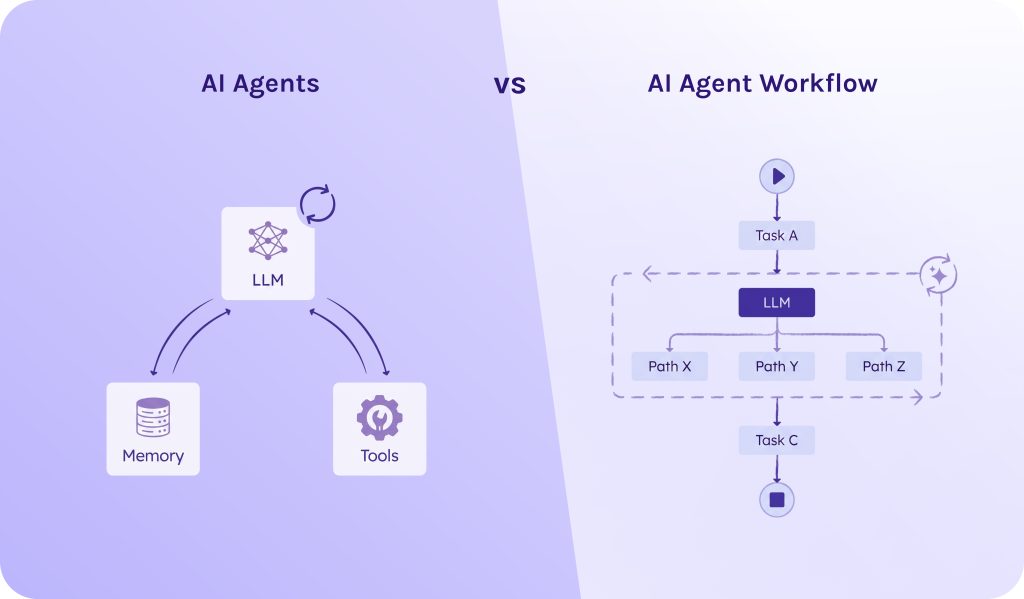
Quite often you may hear about “agentic workflows,” and it sounds pretty similar to AI agents. In fact, they are two sides of the same coin:
- An AI agent is an autonomous worker who is responsible for his part of the work.
- An AI agent workflow is an orchestrated sequence of steps where LLMs perform distinct tasks within defined guardrails.
In simple words, an AI agent is one that makes decisions autonomously. Whereas an AI agent workflow is how steps are connected together.
Read More: Low Code Platform: Complete Guide to Low-Code Development Platforms in 2026
Core Architecture: Anatomy of a Modern AI Agent
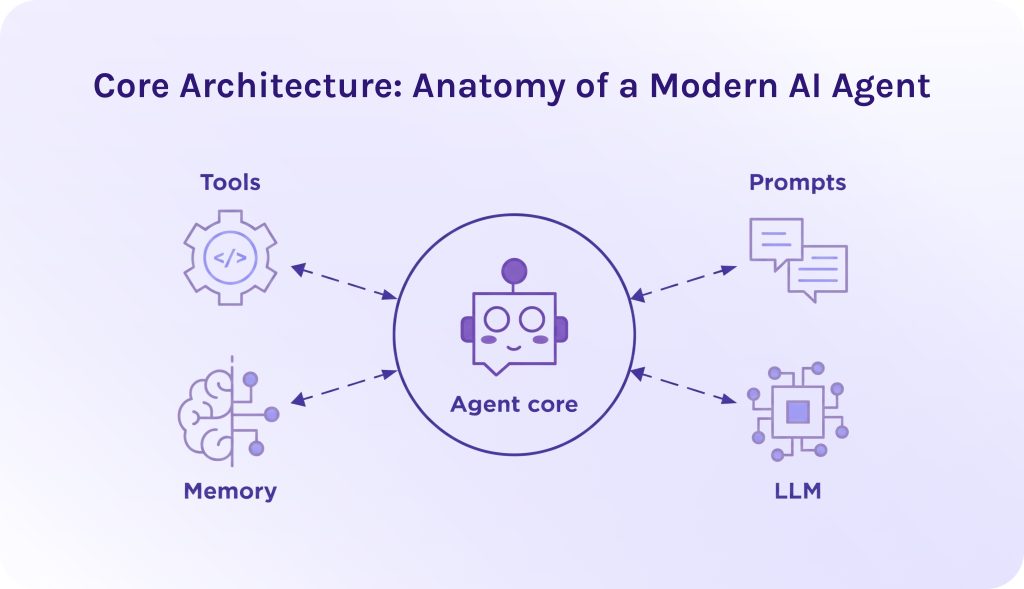
To answer the question “How to create an AI agent?”, we need to understand what parts it should contain.
Obviously, to build robust AI agent platforms, you need to understand that simple prompt engineering isn’t enough anymore. That’s why now we’ll learn more about agentic AI architecture. It relies on a tightly integrated system where four core components continuously cycle through an execution loop.
1. The Model (Brain).
The large language model (LLM) here acts like a cognitive engine. It is responsible for:
- Task decomposition. It breaks down large user goals into a sequence of smaller sub-tasks.
- Reasoning and synthesis. It is capable of parsing ambiguous inputs and evaluating real-time feedback.
- Tool routing. Analyzing tool definitions to decide which tool to invoke, when exactly it would be needed, and, ultimately, what parameters to pass.
2. Instructions & Prompts.
These are instructions to the AI agent platforms that form the operational boundary and operational protocol.
- Persona and scope. Defines the role (when you write “Act like an experienced SEO optimization specialist”) and, consequently, tone and bounds of authority.
- Safety guardrails. These are hard rules explicitly stating forbidden actions (e.g., “Never delete production databases”).
- Execution formatting. Structuring output syntax (like JSON schemas) so the runtime can reliably parse decisions.
3. External Tools & Data Sources.
To execute tasks, agentic AI needs data it can rely on. You can imagine it as the hands and eyes of AI agents that would help them dynamically interact with the external world.
- Data sources. AI agents can browse the web, connect to databases (it doesn’t matter if they’re SQL or NoSQL), REST APIs, and continuous streaming protocols (e.g., WebSockets).
- Executable tools. It can be code execution sandboxes or, for instance, SaaS platform SDKs.
- Standard protocols. AI agent frameworks leverage standardized discovery layers, such as Anthropic’s Model Context Protocol (MCP), to auto-discover and attach tools dynamically.
4. Memory & The Execution Loop.
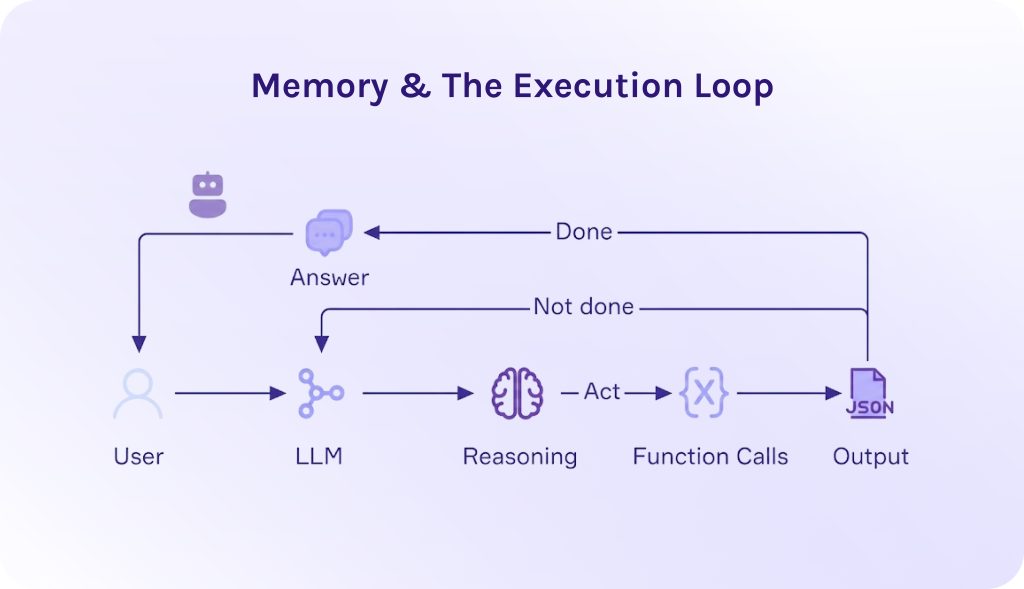
An AI agent operates in an iterative loop, most commonly the ReAct (Reasoning + Acting) framework:
During this loop, memory manages information state across two tiers:
- Short-term (working memory): Captures the immediate conversation window and recent tool outputs within the context window.
- Long-term memory: Uses vector databases (for semantic retrieval / RAG) and key-value stores to recall past execution logs over extended periods.
Workflow Execution Cycle Example
When tasked with “Find and fix the memory leak in production service X”:
- Instructions dictate the system role and mandate sandboxed testing.
- Memory retrieves historical service logs and architecture charts via RAG.
- The model (LLM) reasons about possible causes and plans a sequence of diagnostic checks.
- External tools execute terminal commands to pull telemetry, inspect code repositories, write a candidate fix, run unit tests, and open a pull request.
- The loop repeats the Think → Act → Observe sequence until all unit tests pass, presenting the user with the verified solution.
Read More: AI-Driven Automation as the Foundation of Next-Gen SaaS Models
How to Build AI Agents: Step-by-Step Implementation
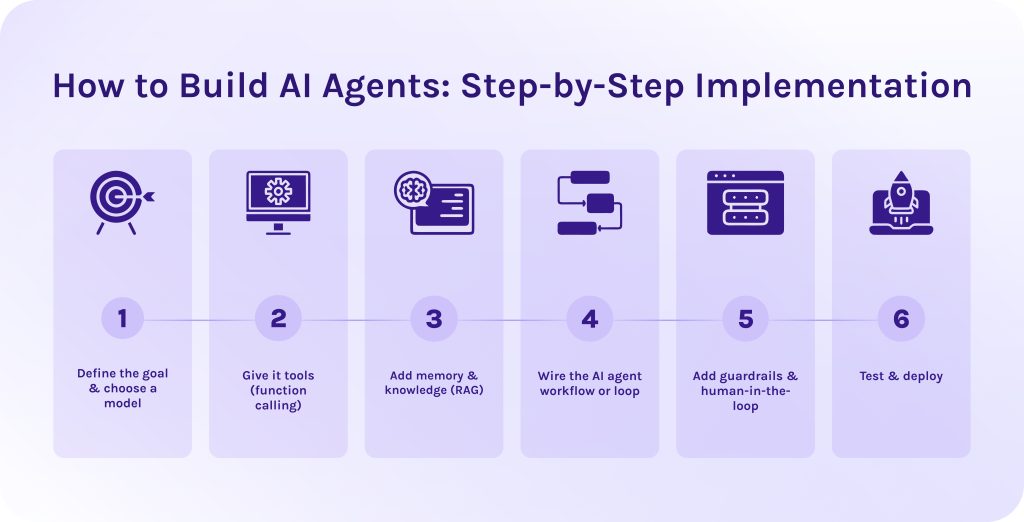
Building AI agents requires a strict and thoughtful plan. Below, we created for you the step-by-step technical implementation guide on how to build AI agents.
1. Define the goal & choose a model.
Establish cognitive requirements and context window sizes.
First of all, when starting building AI agents, select an LLM optimized for instruction following and function/tool call formatting. Here, the list of offered models is almost infinite, but the most popular solutions are OpenAI GPT-4o or, for example, Llama 3.1.
What’s more important, you need to define clear success criteria for how to measure the efficiency of completion. It includes budgeting, context window limits, used tokens, execution time, etc. Note that for every company, the list will vary; thus, you need to focus on your own requirements.
Frankly speaking, it is the most important step. The Gartner research data shows that over 40% of agentic AI projects will be cancelled by 2027, and one of the most critical reasons for it is unclear business value, not technical problems or slow execution times [1].
2. Give it tools (function calling).
Provide JSON schemas for executable tools.
The next step of how to build AI agents is to define function interfaces as strict JSON schemas so the model can construct valid calls. In the code, you should create a function that allows an AI agent to execute read-only SQL queries on a customer database.
It specifies that the tool accepts a single required argument, which must be provided as a valid SQL query string. The system description explicitly restricts the tool’s purpose to read-only operations, serving as a guideline for the LLM to understand when and how to safely use it.
3. Add memory & knowledge (RAG).
Configure short-term context and long-term vector state.
- Short-term memory. Maintain a rolling array of message objects to track conversational state. Use context truncation or summarization nodes when token limits are reached.
- Long-term memory. Connect a vector database using Retrieval-Augmented Generation (RAG) to fetch domain knowledge or past session histories based on semantic similarity.
4. Wire the AI agent workflow or loop.
Implement the ReAct loop pattern.
When you build AI agent with Python, wire up an iterative loop that handles model calls and feeds output back into the context. This loop gives an AI agent its ability to think and take actions.
Here is how the loop must work step by step:
- Storing the goal. The function starts by saving the user’s initial request into the agent’s memory system so it maintains context throughout the workflow execution.
- Starting the loop. It enters a continuous loop where the LLM evaluates the current context and decides what to do next. The model receives both the conversation history and its available functions.
- Checking for completion. The code checks if the model produced a direct text answer without requesting any external tools data. If true, the task is finished: it records the response in memory and returns the final answer to the user.
- Executing tools. If the model decides to run external tools instead of giving a final answer, the code iterates through each requested function call, runs the corresponding function, and captures the output.
- Feeding results back. The workflow execution results are saved to memory and the loop restarts. The model then reads those results to decide its next action, continuing this cycle until the goal is fully achieved.
5. Add guardrails & human-in-the-loop.
Add safety checks and explicit human checkpoints.
- Input/Output guardrails. To create robust AI agent platforms, use libraries like NeMo Guardrails or Llama Guard to filter toxic input or prompt injection attempts.
- Deterministic rules. When building AI agents, intercept high-consequence operations with manual approval steps (human-in-the-loop).
6. Test & deploy.
Set up continuous evaluation pipelines.
- Evaluation agent frameworks. Benchmark agent reliability using test sets with tools like Ragas or DeepEval to measure task completion rate and tool hallucination rates.
- Deployment. Deploy as stateless microservices connected to durable state stores using agent frameworks like EpicStaff or CrewAI.
Read More: AI Agent Management Platform: A Guide to Enterprise AI Agent Orchestration and Governance
Single-Agent vs. Multi-Agent Systems
When choosing between single AI agent and multi-agent systems, you need to take into account:
| Metric | Single-agent system | Multi-agent system |
| System complexity | Low; single prompt and single LLM loop. | High; requires inter-agent communication and state management. |
| Context window overhead | High risk of context saturation (“context anxiety”) as execution steps accumulate. | Low per agent; context is isolated or reset between transitions. |
| Tool capacity | Poor scaling; performance drops when managing >10–15 diverse tools simultaneously. | Excellent scaling; each specialist agent manages 2–5 dedicated tools. |
| Execution cost | Lower base cost per turn. | Higher token usage due to delegation overhead and synthesis calls. |
| Latency | Sequential execution; bottlenecked by single-thread step completion. | Low for independent subtasks (via parallel fan-out execution). |
Opt for a single AI agent when:
- The goal has a continuous linear flow (like basic research loops).
- The task requires fewer than ~10 distinct tools.
- Unified, uninterrupted short-term memory is critical to the entire execution.
Opt for an AI agent orchestration system when:
- Tasks require multiple parallel processes in different domains (e.g., SQL generation + security auditing + financial modeling).
- Sub-tasks can run concurrently to reduce wall-clock execution time.
- Long-running execution loops hit context limits, requiring context resets and state handoffs.
Read More: Top 10 AI Software Development Companies (2026 Guide)
Real-World AI Agent Use Cases
As an illustrative example of the efficiency of a properly selected AI agent for your business. The partnership between Dutch logistics platform Move Your Machine (MYM) and governance-focused AI agent framework EpicStaff, developed by HYS Enterprise, represents one of the most compelling real-world enterprise AI agent use cases in modern supply chain management.
The main struggle that MYM faced was too many manual operations and further business losses connected to them (efficiency, delays, budgets, etc.) Thus, instead of relying on human operators to juggle phone calls and spreadsheets, MYM deployed an autonomous multi-agent system to handle heavy machinery transportation across Europe.
Custom AI Agent Development with EpicStaff
Using EpicStaff’s visual workflow orchestration, the agent combines Python-based calculation logic with LLM reasoning and persistent state memory.
- Perception & parsing. The agent receives unstructured machinery details submitted by a user.
- Real-time pricing. It processes spatial and distance data through Python nodes built into EpicStaff, executing pricing formulas dynamically.
- Carrier matching & dispatch. The agent automatically filters available transport partners, selects the optimal carrier, and reserves the capacity.
- Persistent context. EpicStaff retains agent state across sessions (using Redis/PostgreSQL), allowing the agent to remember customer preferences and recurring routes.
Business impact
- Quote speed. Reduces quote generation time from hours to under 60 seconds.
- Cost efficiency. Cuts administrative overhead by eliminating manual dispatcher data entry. Plus, the platform is maintained by a team of two people instead of twenty.
- Scalability. Handles fluctuating quote volumes 24/7 without requiring additional headcount.
Custom AI agent development doesn’t have to mean starting from scratch or losing control over your operational logic. Get in touch with our engineering team today to kickstart your custom AI agent journey.
Read More: What Are the Top 10 n8n Alternatives to Watch This Year
Conclusion
How to build AI agents? Well, as we’ve walked through, there are many robust AI agent frameworks presented in the market, and EpicStaff is one of them. This solution allows you to create your own digital crew and assign each agent to a specific task, like a true project team.
Here are some important moments to remember:
- Building a scalable agent requires a tight loop between a high-reasoning LLM, explicit instructions and prompts, dynamic external tools or data sources, and robust short/long-term memory.
- Leverage specialized agent frameworks like EpicStaff to give non-technical operations teams visual control while developers handle backend Python logic and system integrations.
- With high failure rates in unguided AI pilots, prioritize specific high-friction business bottlenecks with measurable ROI before scaling to full multi-agent orchestration.
- Deploying targeted AI agent use cases, such as heavy machinery logistics (e.g., Move Your Machine) or software engineering automation, delivers measurable ROI by turning hours of manual work into automated processes.
Hope that in this article you’ve understood how to create an AI agent, and this guide will help you navigate through the whole process seamlessly. Wish you luck!
FAQs
1. How to build AI agents?
- Clearly define the goal and business value that agentic AI will bring. Without it, most projects are likely to fail.
- Choose an LLM model suitable for your business requirements.
- Connect to the external tools data through SQL queries in JSON schema to make database calls.
- Configure short-term and long-term memory (RAG).
- Implement the ReAct loop.
- Add safety guardrails and human-in-the-loop checkpoints.
- Ultimately, test your agentic AI workflow and deploy it.
2. Is it free to build an AI agent?
Yes, you can build an AI agent for free using open-source frameworks or free tiers on no-code tools. However, scaling to complex production workflows usually incurs costs for underlying cloud infrastructure or, for instance, database hosting.
3. What is the hardest part of building AI agents?
According to the research, the hardest part of AI agent development is to ensure that reasoning is robust and reliable [6]. Especially in real-world environments that suffer from hallucinations and compounding errors, minimizing risks is a great challenge.
4. What are the top 3 AI agents?
While the landscape of autonomous software evolves rapidly, the top 3 AI agents in 2026 depend on your specific domain and operational needs:
5. What are the 5 types of AI agents?
According to IBM, there are five following types of AI agents [3]:
6. Do I need to know how to code to build an AI agent?
No, you don’t need to know how to code to build a working AI agent. Modern platforms that allow you to create multiple AI agents don’t require programming skills. They offer drag-and-drop, visual agent builders where you can move preprogrammed nodes and connect them, creating complex automation workflows. However, if you need to create more advanced workflows or custom functionality, you might require the help of software developers with knowledge of Python or JavaScript.
7. Why do most AI agents fail in production?
8. Is it true that 95% of AI projects fail?
Yes, it is true. Research published by the MIT “State of AI in Business” report revealed that despite tens of billions of dollars invested in enterprise generative AI pilots, 95% yielded no measurable financial return or failed to scale to full production [4].
Most failures occur during the transition from a “Proof of Concept” (PoC) to a secure, enterprise-grade production environment. The 5% of companies succeeding are those focusing on back-office workflow optimization and strict ROI tracking from day one.
9. How much does it cost to build my own AI agent?
The cost to build an AI agent ranges from $0 for a basic DIY bot up to $250,000+ for a multi-agent enterprise platform. Where you land depends on three factors: who builds it (DIY, agency, in-house), how complex it is, and ongoing operational costs [5].
10. What’s the difference between an AI agent and a chatbot?
Both, an AI agent and a chatbot, use natural language to process information and give responses. However, the core difference lies in architectural and memory usage:
References
- https://www.gartner.com/en/newsroom/press-releases/2025-08-26-gartner-predicts-40-percent-of-enterprise-apps-will-feature-task-specific-ai-agents-by-2026-up-from-less-than-5-percent-in-2025
- https://www.pwc.com/us/en/tech-effect/ai-analytics/ai-agent-survey.html
- https://www.ibm.com/think/topics/ai-agents
- https://mlq.ai/media/quarterly_decks/v0.1_State_of_AI_in_Business_2025_Report.pdf
- https://www.ai-agentsplus.com/blog/ai-agent-development-cost-pricing-guide-2026
- https://www.researchgate.net/publication/394432078_A_Research_Landscape_of_Agentic_AI_and_Large_Language_Models_Applications_Challenges_and_Future_Directions
- https://www.fortunebusinessinsights.com/business-process-automation-market-116500
- https://www.researchgate.net/publication/393019883_Applications_of_AI_Agents_A_Comprehensive_Review