
What is capacity planning?
First of all, let’s discuss, “What is capacity”?
The term “capacity” means the maximum amount of work that a team or production system can realistically complete within a specific timeframe [3].
To be more precise, I’ll give you an example. Imagine an apple tree and an empty bucket. In this analogy, the bucket will be the team’s capacity, while apples will be work the team needs to complete. No matter how many apples you want to put into this bucket, it can hold a limited number of fruits before they start spilling over the edges.
You cannot force a 50-apple project into a 30-apple bucket just because the client or stakeholder wants you to. Instead, you have two logical strategic choices:
- Get a bigger bucket (increase team capacity by hiring more people or, for instance, optimizing workflows) [6].
- Leave some apples on the tree for later (manage demand by prioritizing the backlog and pushing lower-priority tasks to the next sprint) [6].
Read More: A Complete Guide to the Leading Resource Management Tools in 2026
What is сapacity planning in Jira?
Capacity planning in Jira is the data-driven process of matching your team’s available working hours or story points against the estimated effort of the tasks in your backlog.
Essentially, it is a resource management practice that uses Jira’s tracking features to ensure the volume of work assigned to a team or individual does not exceed their actual availability during a given period of time.
Read More: The Next Generation of PMO Tools: How to Choose the Perfect One for You
What are the benefits of Jira capacity planning?
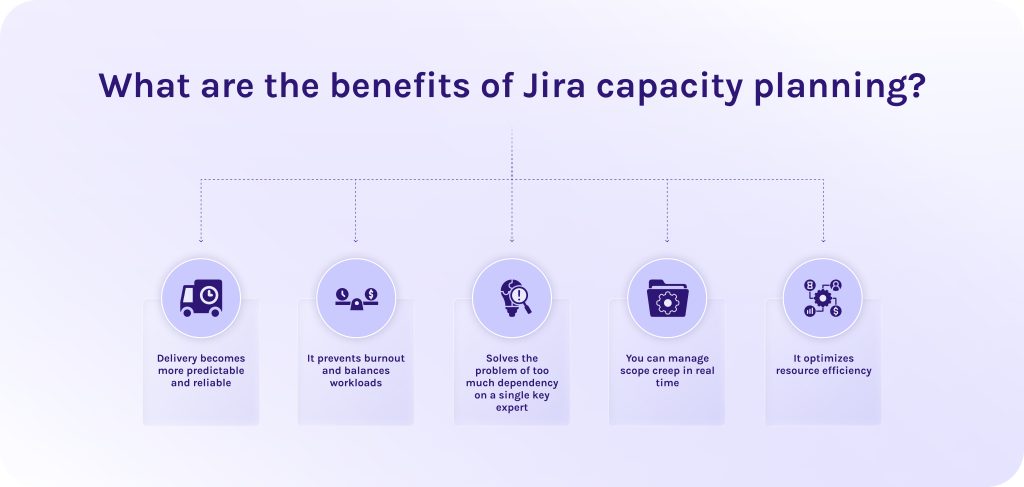
Below we’ve listed some of the benefits of capacity planning with Jira software.
- Delivery becomes more predictable and reliable. Now, you don’t need to guess what a team can finish by a specific deadline. Resource capacity planning in Jira uses historical velocity data to calculate future output.
- It prevents burnout and balances workloads. Over-allocating work leads to cognitive fatigue and increased bugs. Jira resource capacity planning instantly flashes red when a team or individual is over-allocated. It, in turn, allows managers to reassign tasks between specialists before the sprint begins.
- Solves the problem of too much dependency on a single key expert. Relying too heavily on a single specialist (e.g., a senior architect or DevOps engineer) is a common project risk. Jira capacity planning allows you to track individual availability alongside team availability.
- You can manage scope creep in real time. Scope creep is unplanned changes that stakeholders or top management make when everything is already planned. Capacity planning tools visualize the impact of changes on team velocity, while advanced features like “what-if” analysis can predict how changes in one project will affect the entire portfolio.
- It optimizes resource efficiency. Jira resource capacity planning ensures that your specialists won’t be accidentally double-booked or booked at 100% capacity. It also can adjust schedules to prevent burnout and leave room for emergent fixes or unplanned work.
Interested in this topic? Read other articles at our blog to learn how leading development teams scale their workflows.
Read More: Tired of MS Project? 16 MS Project Alternatives for Modern Teams
What are the best Jira capacity planning tools?
We were talking a lot about resource capacity planning itself, so now it’s time to take a closer look at the exact Jira capacity planning tools.
ActivityTimeline: for resource planning and time tracking.
Best for
Visual resource planning and individual capacity tracking.
Core strength
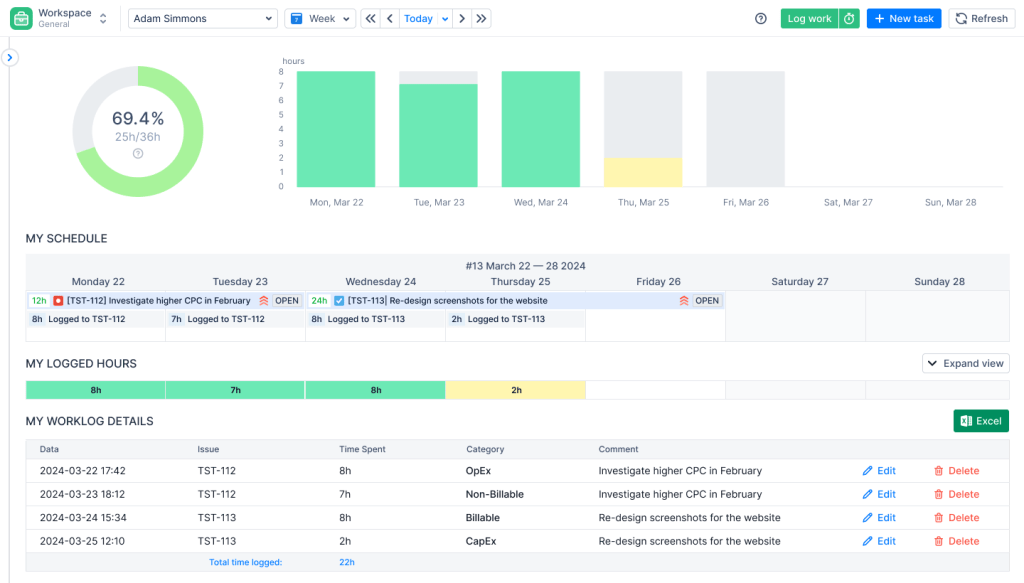
This resource capacity planning tool provides an interactive dashboard (resembling a calendar or timeline grid) where managers can drag and drop Jira tasks directly onto a team member’s schedule [4].
Key features
- Individual and Team views. Drills down past macro team metrics to see if an individual contributor is overbooked on a specific day.
- Skill and Position filters. This capacity planning feature allows filtering of resources by expertise to allocate the right person to the right task.
- Leave and holiday management. Tracks vacations, sick leaves, and public holidays inside the planner.
Tempo Planner: for resource planning and capacity planning.
Best for
Enterprise-grade resource optimization and centralized capacity planning.
Core strength
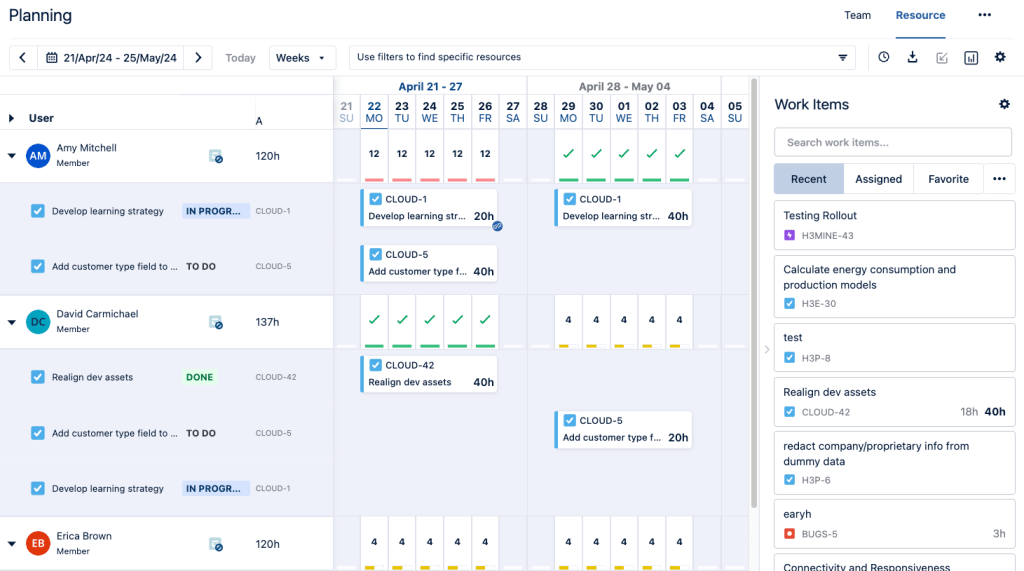
As one of the most widely used capacity planning tools in the Atlassian ecosystem, it excels at long-term capacity forecasting. It seamlessly integrates with Tempo Timesheets (for actuals tracking) and Tempo Budgets (for financial tracking).
Key features
- Creates centralized resource pools. Among other Jira capacity planning tools, this one enables the creation of shared teams across multiple projects, which prevents cross-functional specialists from being double-booked.
- Allows you to analyse utilization rates. Provides high-level dashboards showing planned vs. actual time to calculate true team capacity and efficiency.
- Generic resource placeholders. This capacity and resource planning feature allows project managers to plan capacity using a placeholder before assigning tasks to specific individuals.
BigPicture: project management and PPM.
Best for
Scaled Agile Framework (SAFe) and classic project portfolio management (PPM).
Core strength
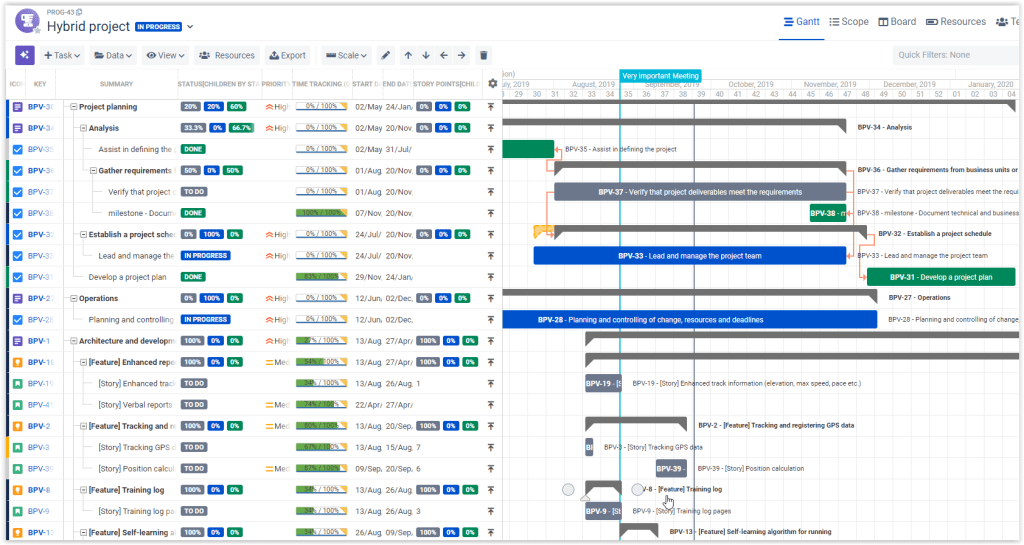
BigPicture is a comprehensive portfolio management powerhouse. While other tools focus strictly on time and team capacity, BigPicture connects resource capacity planning directly to cross-project dependencies and strategic initiatives.
Key features
- Advanced resource capacity planning module. This instrument for capacity planning in Jira displays a synchronized panel showing Gantt charts on top and real-time team allocation/capacity bars on the bottom.
- Cross-project dependency mapping. Shows how shifting a task due to a team capacity constraint will impact the timeline of an entirely separate project.
- SAFe support. Includes specialized modules for Program Increment (PI) planning and agile board configurations across massive scale.
Capacity Tracker.
Best for
Agile capacity planning and teams (Scrum & Kanban) seeking a lightweight way to prevent overcommitments.
Core strength
It is built specifically to operate cleanly inside standard Jira Scrum and Kanban boards without adding administrative complexity.
Key features
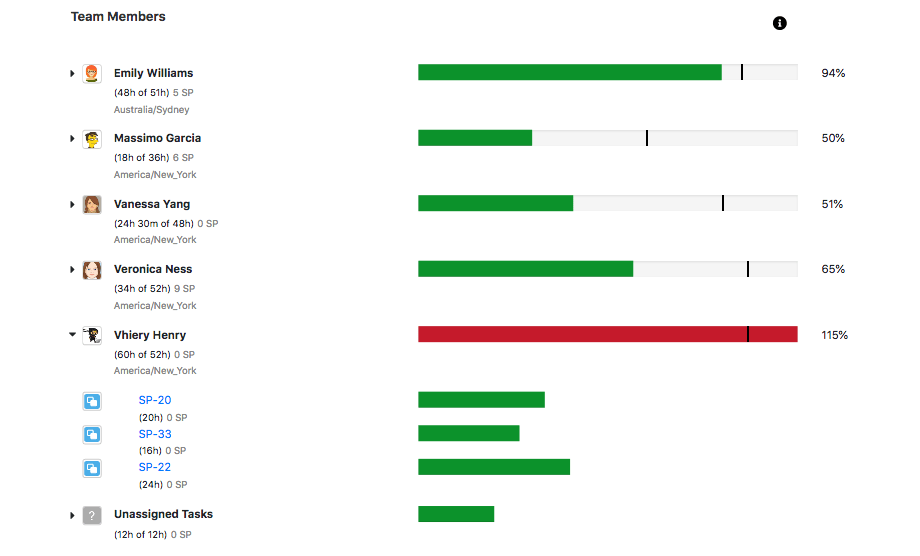
- Sprint availability matrix. Simplifies sprint planning and allows team members to quickly input their availability for the upcoming sprint directly from the board.
- Live workload tracking. Aggregates story points or time tracking estimates instantly as tickets are groomed and assigned.
Read More: 10 AI Project Management Tools to Pay Your Attention to in 2026
What are the best practices of capacity planning for agile teams?
Resource planning and tracking
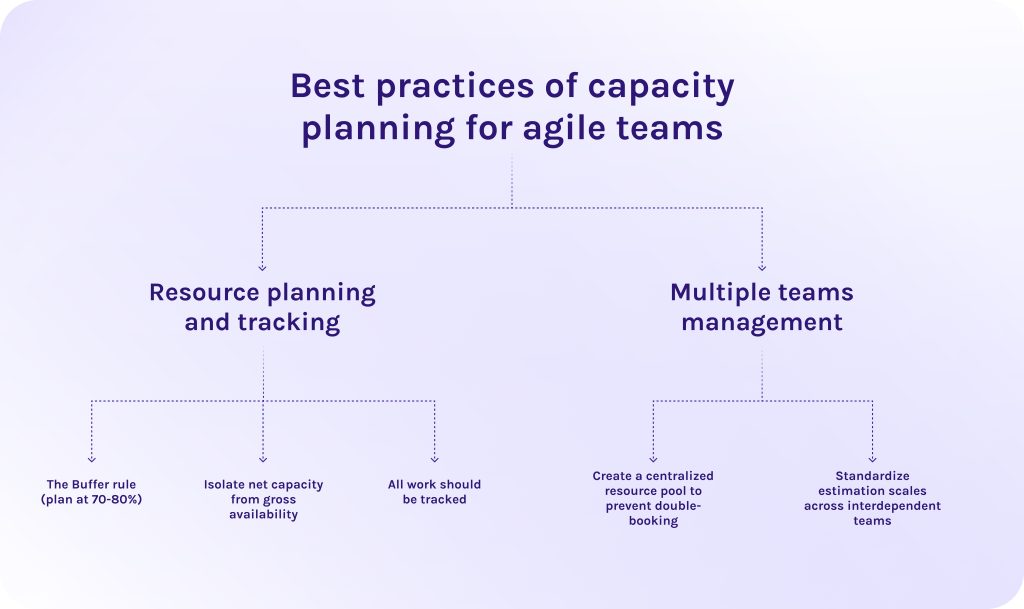
1. The Buffer rule (plan at 70-80%).
The most common point of failure in resource capacity planning in Jira is assuming 100% efficiency. But people are not machines. Capacity and resource planning for a full 40 hours of deep project work per week results in missed deadlines and burnout. Cap your team allocation at 70–80% of total available time.
2. Isolate net capacity from gross availability.
Gross availability is simply the number of working days on a calendar. Net capacity is the actual time available for project tasks. Before committing to a sprint backlog, subtract company holidays, planned personal time off (PTO), and dedicated learning or hackathon days directly within your tracking capacity planning software.
3. All work should be tracked.
For short-term execution (sprints), Story Points are superior because they measure task complexity and abstract effort. However, for long-term financial budgeting, leadership requires hours. Use your historical velocity to find your team’s unique conversion ratio.
Multiple teams management
1. Create a centralized resource pool to prevent double-booking.
In organizations with complex, multi-project workflows, cross-functional specialists are frequently shared across multiple product teams. Without centralization, they risk being booked at 100% capacity on three different boards simultaneously. Capacity planning software creates a single source of truth and automatically tracks resource dependencies across different projects simultaneously [5].
2. Standardize estimation scales across interdependent teams.
When teams share dependencies or work toward a unified release train, standardize your estimation baseline. In this case, standardizing data inputs allows multi-team portfolio timelines to run dynamic automated scheduling without skewing the predictive metrics.
Read More: Product Portfolio Management Tools: Complete Guide to Choosing the Best Solution in 2026
Final thoughts
Jira resource capacity planning isn’t an easy process, but it pays off in much more predictable outcomes, reduced team burnout, and a highly optimized allocation of your most valuable assets: your people. When you don’t rely on your gut feeling and start to create your capacity planning plan with the help of mature tools like Jira, it brings your processes to an absolutely new level.
As you navigate the inevitable shifts in day-to-day operations, consider the timeless insight shared by Winston Churchill [7]:
“Those who plan do better than those who do not plan, even though they rarely stick to their plan source.”
If you’re not sure that you can implement these tools into your workflows independently, HYS Enterprise‘s dedicated developer team knows how to do it without losing efficiency. Book a call with our experts today to identify capacity bottlenecks and seamlessly integrate the right resource management tools for your business.
FAQs
1. What is Jira capacity planning?
Jira capacity planning is the process of matching your team’s available working hours (or story points) against the volume of work in your backlog. This process is extremely important to ensure that you commit to realistic goals during sprint or project planning and helps prevent delays.
2. Does Jira have capacity planning built in?
Yes, but it depends on your version. Basic Jira doesn’t offer comprehensive resource capacity planning tools out of the box. However, if you use Jira Premium or Enterprise plans, you gain access to native cross-project capacity planning and resource leveling [8].
3. How do I track team utilisation in Jira?
You can track team utilization natively in Jira Plans, comparing the team’s total maximum resource capacity against the estimated hours assigned to them.
4. Can Timesheet Builder handle multiple teams?
Yes, absolutely. Plugins like Timesheet Builder are specifically designed to handle multiple teams simultaneously. Team leads can create independent teams, assign unique user roles, and apply custom holiday/workload calendars to ensure reliable sprint planning across the entire organization.
5. What are the benefits of Jira capacity planning?
6. What is the difference between velocity and capacity?
7. How do I set capacity for an individual in Jira?
In Jira Plans, you navigate to the Teams view, locate the individual team member, and define their specific weekly hours. To make this calculation precise, you can associate them with specific workload calendars and input their planned leave or company holidays, automatically recalculating their net availability [11].
8. How is AI used in Jira capacity planning today?
AI greatly reduces the guesswork in modern agile planning. It uses Natural Language Processing (NLP) to scan historical ticket descriptions and metadata. As well, it automatically flags hidden complexities or suggests risk-adjusted story point estimates. AI is also used to run “What-If” scenario simulations, predicting how team changes or shifting dependencies will alter your overall capacity layout.
9. What are the common pitfalls of capacity planning?
10. Should we plan at 100% capacity?
No, you should never plan at 100% capacity. It leaves zero room for error and leads to missed deadlines whenever an emergency bug or sick day arises. Best practices recommend planning at 70–80% resource capacity, reserving the remaining 20% as a vital buffer for unplanned work and technical debt resolution [12].
References
- https://www.researchgate.net/figure/BM-System-Science-Institute-Relative-Cost-of-Fixing-Defects_fig1_255965523
- https://www.iq-it.co.uk/blog/hidden-cost-of-context-switching#:~:text=Every%20interruption%20costs%20more%20than,how%20to%20take%20it%20back.
- https://www.researchgate.net/publication/223616425_The_challenges_of_capacity_planning
- https://activitytimeline.com/
- https://www.researchgate.net/publication/404469659_Strategic_Capacity_Planning_for_Enhancing_Business_Performance_in_the_Transport_Sector
- https://www.researchgate.net/publication/341672649_Efficient_Techniques_for_Leading_Teams_Building_and_Improving_Teamwork
- https://quotefancy.com/quote/940233/Winston-Churchill-Those-who-plan-do-better-than-those-who-do-not-plan-even-should-they
- https://www.atlassian.com/software/jira/pricing
- https://www.researchgate.net/publication/344751140_A_Definition_of_Velocity_Explaining_the_Irreversibility_of_the_Arrow_of_Time_and_Predicting_the_Measurability_of_Absolute_Motion
- https://www.researchgate.net/publication/315148637_Capacity_A_Literature_Review_and_a_Research_Agenda
- https://www.atlassian.com/software/jira
- https://essay.utwente.nl/fileshare/file/81541/Denekamp_MA_BMS.pdf